
In-game configurable party buff automation (spells, items, potions, summons, and presets) for BG:EE, BG2:EE, EET, and IWD:EE powered by EEex.
BuffBot Guide · Latest Release · Built into Chriz Easy BG & Chriz Easy IWD
Requires EEex v0.11.0-alpha or later with LuaJIT active (EEex v1 recommended).
Cast all your pre-battle buffs with one click. BuffBot scans each character's spellbook, items, and potions, lets you choose targets, repeat counts, and cast order, then buffs the entire party in parallel.
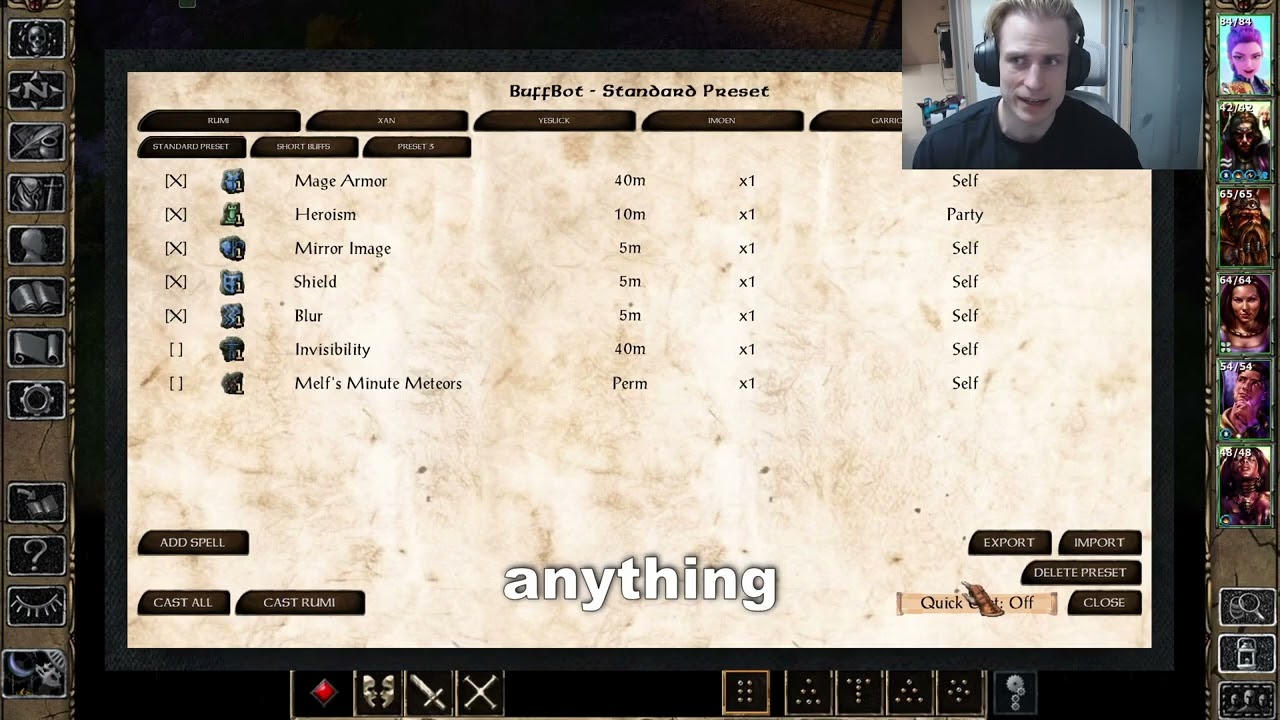
| BG2 Dark Theme | BG1 Light Parchment Theme |
|---|---|
 |
 |
- Up to 8 presets per character: Auto-populated Long Buffs and Short Buffs defaults plus custom presets (create, rename, delete, copy across campaigns via Export/Import).
- Right-click gear quick-cast: Right-click the actionbar gear icon to trigger any named party preset without opening the panel.
- Spells, items & potions: Dynamically scans memorized, innate, HLA, and kit spells alongside identified gear powers and backpack potions (optional temporary equip-use-restore for backpack items).
- Summons & clones: Dedicated Summons tab configures Project Images, Simulacra, and allied spellcasting summons to run alone or alongside Cast All.
- 2x / 4x speed & Quick Cast: Accelerate single-player prebuffing (
Normal/2x/4x, automatically stopping on combat or UI popups), or use per-preset Quick Cast (Off/Long/All) with Improved Alacrity. - Smart active-buff handling: Automatically skips active buffs, refreshes buffs about to expire (Refresh Low), or forces re-casts (Force All).
- Flexible control & 9 languages: R1–R5 repeat counts, priority ordering, row locks, manual Add Spell/Item override, subwindow variant pre-selection, experimental 5E Spellcasting support, and 9 UI languages.
- Supported games: BG:EE, BG2:EE, EET, and IWD:EE (
2.7.3.0verified). - Prerequisite: EEex v0.11.0-alpha+ with
LuaJIT enabled (on EEex v0.11, install late after biffing; on EET, install after
EET_end).
- Download the latest release and extract it into your game directory.
- Run
setup-buffbot.exe(or your WeiDU mod manager). - Select BuffBot: EEex LuaJIT Support (component
1) first if EEex has not already activated LuaJIT. - Select BuffBot: In-Game Buff Automation (component
0) once LuaJIT is active.
Updating / Project Infinity / Uninstall: Select both components together in Project Infinity (
1before0) and when updating older installs. Uninstall In-Game Buff Automation first, then EEex LuaJIT Support if BuffBot installed it.
- Press F11 or click the actionbar button to open the panel (or right-click the actionbar gear to cast a preset immediately).
- Pick a character tab and preset tab, check the buffs/items to cast, set targets
(
Self,Party, or specific companion), repeats (R1–R5), and priority order. - Choose Speed (
Normal/2x/4x), Quick Cast (Off/Long/All), or Active mode, then click Cast or Cast All.
Configure the global threshold under EEex options → BuffBot → Refresh buffs that are
nearly over (off, 1 min, 5 min, 1 hr, or [BuffBot] RefreshBelow in baldur.ini).
The panel's run-local Active button overrides it for one run (BfBot.Exec.SetForceMode(2) sets Force All from console):
| Mode | Behavior |
|---|---|
| Active: Skip | Default. Skip running buffs unless below the EEex refresh threshold |
| Active: Refresh Low | Re-cast running buffs below threshold (defaults to 5 min if option is off) |
| Active: Force All | Unconditionally cast every configured buff regardless of remaining time |
- Items & potions: In EEex options → BuffBot → Inventory item use, choose Use from inventory (default) or Equip, use, and restore (skips chest armor, unusable gear, and duplicate resrefs; scrolls, wands, and containers are not scanned).
- Summons & Project Image: Set
SummonsJoinCast = 0under[BuffBot]inbaldur.inito disable automatic summon casting during Cast All. Project Image casts are capped at 1 attempt and lock subsequent owner actions in that queue. - 5E Spellcasting (experimental) & IWD:EE: Auto-detected when 5E Spellcasting is installed before BuffBot (manual-cast variant-selection spells on 5E casters). See the 5E tester guide and validation notes.
- Known limitations: Charge-based buffs like Stoneskin do not track remaining skins
for refresh thresholds; Export/Import (
override/bfbot_presets/) file listing uses Windowsdir /b; some Spell Revisions sub-spells need manual Add Spell.
- Presets & repeats: Long Buffs and Short Buffs auto-populate on first open
(newly recruited companions inherit the protagonist's preset names and slots). Repeats
(
R1–R5) run target-major (A, A, B, B); AoEs run N times total. - Reporting bugs: Open an issue on
GitHub Issues with your game
and EEex versions, mod list, reproduction steps, and
BfBot.Test.RunAll()/BfBot.FiveE.Diagnose()logs if relevant.
BuffBot supports 9 languages: English, Simplified Chinese, Italian, German,
French, Spanish, Polish, Russian, and Brazilian Portuguese. WeiDU copies the selected
UTF-8 catalog to override/bfbot_l10n.tra — BuffBot reads directly from that file and
writes nothing to dialog.tlk (legacy F12 preset innates are automatically stripped
from older saves on load).
See Localization & Translation Guide for raw-deploy rules, validation status, and step-by-step contributor instructions for adding a language.
Toggle the EEex/CLUA console (Ctrl-Space) in-game for built-in diagnostics:
BfBot.Test.RunAll()         -- full in-game test suite (600+ assertions)
BfBot.Test.ExportImport()   -- export/import tests
BfBot.UI.Toggle()           -- open/close panel (BfBot.FiveE.Diagnose() for 5E)
For source development without re-running WeiDU: configure tools/deploy.conf with
BGEE_DIR="/path/to/game" and run bash tools/deploy.sh.
bg-eeex-buffbot/
├── buffbot/    # setup-buffbot.tp2, M_BfBot.lua, BfBot*.lua, BuffBot.menu, lang/, visual/
├── tools/      # build-release.sh, deploy.sh
├── docs/       # Design docs, images, 5E & localization guides
└── tests/      # Offline LuaJIT & WeiDU packaging test suite
- Zach Hopkins — BuffBot Redux architecture, HUD presets, items, 2x/4x speed, and themed art layer
- Pecca — Infinity UI++ themed control artwork (used with permission)
- EEex (Bubb), Bubble Buffs (factubsio), 5E Spellcasting (subtledoctor), Endarire
- Translators & AI tooling: robovoid (Simplified Chinese, PR #50), Sauler89 (Italian), OpenAI Codex, and Claude Code
MIT License for BuffBot's own code. The themed control artwork under
buffbot/visual/ is used with permission and is not covered by MIT — see
ATTRIBUTION.md before redistributing it.