
Open-source, self-hosted web .docx editor with real-time co-editing — a Google Docs / Word Online / OnlyOffice alternative you run on your own server.



Live Demo → · Docker Hub → · Architecture →
The hosted demo is single-user (try the editor). Real-time co-editing runs in the Docker image — one container, share a link, edit together.
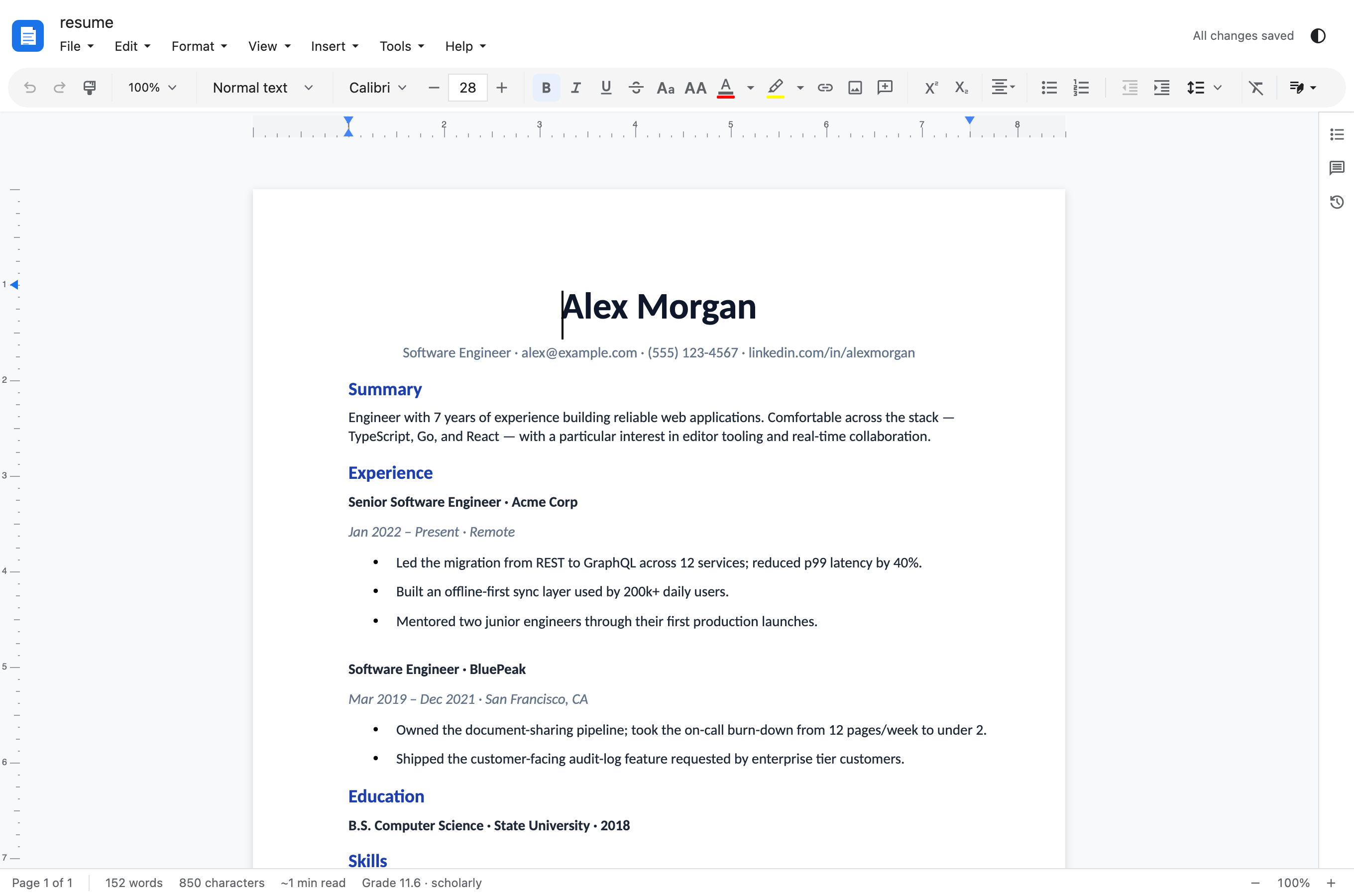
Casual Docs is a self-hostable, browser-based .docx editor that looks and behaves like Microsoft Word — ribbon-style toolbar, paginated WYSIWYG layout, file-centric workflow — with real-time multi-user co-editing built in. Upload a .docx, share a link, edit together instantly. No accounts, no Microsoft / Google login, no lock-in. One Docker container running the Node collab server (Hocuspocus + Yjs), in-memory rooms.
Sister projects: Casual Sheets (.xlsx) and Casual Slides (.pptx).
Core editing — a full Word-style writing surface
- Paragraphs, runs, tables (borders, shading, merged cells, header rows, table styles), lists (multi-level bullet/numbered), hyperlinks, footnotes/endnotes
- Full character formatting — bold/italic/underline (styled + colored), strike, super/subscript, small/all caps, character spacing, RTL/LTR; paragraph + character styles with inheritance
- Find & Replace (match-case / whole-word / regex), command palette (Ctrl+Shift+P), canonical Word keyboard shortcuts
- Writing aids — spell check (Hunspell), autocorrect + smart quotes, translate-selection, dictionary/explore lookup, citations, voice typing, document outline, live word/character/reading-time counts
- Autosave + restore (IndexedDB), recent files, Print / Export-as-PDF with page setup
Word compatibility — OOXML fidelity, not a lossy import
- Paginated WYSIWYG — true page breaks, headers/footers, page numbers, multi-column sections
- Full WordprocessingML core + DrawingML rendering: pictures, shapes, textboxes (modern + VML),
wpg:wgpgroups with per-child positioning/rotation, behind-text anchoring, math equations - Comments & tracked changes, theme colors/fonts, the style inheritance chain
- Tag-level round-trip audit (
roundtrip-audit.mjs) parses → re-serializes → diffsdocument.xml; each fidelity fix is pinned by a unit test and (where visible) an e2e/visual-fidelity spec against a LibreOffice reference
Collaboration — real-time, in the Docker image
- Share dialog — File → Share: get an edit URL and a view-only URL
- Presence avatars + live cursors (each peer's selection in their color, name-labeled)
- Full mutation sync — text, formatting, lists, tables, images, comments, headers/footers propagate cross-peer; view-only enforced at the Y.Doc layer
- Lightweight password-protected rooms for link sharing (constant-time compare on the WS upgrade). This is sharing-grade protection, not an identity system — for production auth, integrate through the WOPI / JWT-API host interface
- Stateless backend — no DB, no on-disk log; rooms live in memory, persistence delegated to the host (inline, WOPI, or JWT-API)
File formats — open & save round-trip
| Format | Open | Save / Export | Path |
|---|---|---|---|
.docx |
✅ | ✅ | native parser + serializer |
.odt |
✅ | ✅ | @casualoffice/core WASM worker (lazy) |
.md |
✅ | ✅ | @casualoffice/core WASM worker (lazy) |
.txt |
✅ | ✅ | @casualoffice/core WASM worker (lazy) |
| — | ✅ | browser print pipeline (Save as PDF) |
Non-DOCX formats convert to/from DOCX bytes in a Web Worker (Rust + WASM); the ~3.3 MB artifact is lazy-loaded so the initial bundle stays slim.
Developer & self-hosting — embeddable, extensible, one container
<DocxEditor>React component (@casualoffice/docs) + an extension system for custom nodes/marks/menus- i18n — translatable toolbar/dialog strings with a CI-enforced, auto-derived
LocaleStringstype - Single multi-arch Docker image (
linux/amd64+linux/arm64): editor SPA + Node collab server (Hocuspocus + Yjs) in one container behind one port - Material-Symbols icons bundled as SVGs (no font fetch)
See docs/ARCHITECTURE.md for the full design.
Inline ask, rewrite panel, DocOps chat (pre-release — in active development)
These features are gated on model availability and are off by default until a model is confirmed reachable. Nothing in the AI layer is shown to the user until that check passes.
Inline ask pill
Select text in the document and an ask pill appears above the selection. Type a prompt and press Enter to send. On desktop (Casual Desktop app), the pill is available when a local model is loaded. On the web, it requires an Anthropic API key configured in the collab server. The keyboard shortcut Cmd+J (Mac) / Ctrl+J (Windows/Linux) opens the pill from the keyboard when AI is available.
AI Suggestion Panel
A right-docked panel for rewrites and summaries. After submitting a prompt from the inline pill, the panel opens and streams the response token by token. Tone chips along the top of the panel let you adjust the output before or after generation: Polish, Concise, Formal, Casual, Shorter, Longer. Controls:
- Accept — replaces the selected text with the suggestion
- Reject — discards the suggestion, returns focus to the document
- Stop — halts in-flight generation (replaces Retry while the model is running)
- Retry — re-runs the last prompt after generation finishes
Status labels reflect the active operation ("Rewriting...", "Summarizing...") rather than a generic spinner.
DocOps chat panel
A separate panel for document-level operations: restructure, insert boilerplate, apply section templates. Responses stream in real time via SSE. This panel is the primary surface for the DocOps IR mutation set (see roadmap below).
Model gating
| Context | Model path |
|---|---|
| Casual Desktop (macOS) | Local llama.cpp model via the ai-worker sidecar; Metal GPU acceleration; fully offline |
| Web / Docker | Anthropic API key set on the collab server (CASUAL_AI_API_KEY); no local model required |
If neither condition is met, all AI UI is hidden. There is no degraded or stubbed state.
Streaming
Both the DocOps panel and the AI Suggestion Panel receive responses as SSE streams. Tokens appear in the in-flight bubble as they arrive; the panel commits the full response once the stream closes.
What is coming next (DocOps Phase 1)
- Full mutation set: insert/delete/move/replace at paragraph and section granularity, applied as ProseMirror transactions so undo works normally
- Accept/reject in-document: suggested changes rendered as tracked-change overlays, accepted or rejected inline without leaving the document
- Casual Sheets AI: the same DocOps IR and model-gating infrastructure extended to the spreadsheet surface
These are tracked in docs/internal/31-docops-architecture.md.
A single multi-arch image. The editor SPA and the Node collab server (Hocuspocus + Yjs) run in one container behind a single port.
docker run --rm -p 8080:8080 casualoffice/docs:latestOpen http://localhost:8080. Upload a .docx, click Share, send the link.
services:
  app:
    image: casualoffice/docs:latest
    restart: unless-stopped
    ports: ['8080:8080']
    environment:
      PORT: '8080'
CASUAL_FILE_EXT: '.docx'- Open
http://localhost:8080. Upload a.docx, then File → Share for co-editing… to set a password and get two URLs. - Paste either URL into another browser or device — the joiner connects in under a second.
- Type — peers see characters appear in real time, with named cursors tracking selection.
| Method | Path | Description |
|---|---|---|
GET |
/ |
Serves the built editor SPA |
POST |
/api/rooms |
Mint a transient share-link room — returns {roomId} |
POST |
/api/rooms/:id/seed |
Seed a room with the starting .docx bytes |
GET |
/api/rooms/:id/seed |
Fetch the room's seed bytes (joiners) |
GET |
/health |
Liveness probe |
WS |
/yjs |
Hocuspocus sync; room name travels in the handshake |
| Env var | Scope | Default | Description |
|---|---|---|---|
PORT |
server | 8080 |
HTTP + WebSocket listen port |
CASUAL_STORAGE |
server | memory |
Room Y.Doc persistence: memory / local / redis |
CASUAL_LOCAL_PATH |
server | /data |
Path for local storage (mount a volume) |
CASUAL_FILE_EXT |
server | .docx |
File extension for the host integration |
CASUAL_PERSONAL_MODE |
server | none |
Personal auth (Mode 3): none / single / multi |
VITE_COLLAB_ENABLED |
build | true in image |
Include co-edit code in the bundle |
Prerequisites: Bun ≥ 1.3.14 (editor), Node ≥ 22 (collab server, the ./collab submodule)
# Editor (browser side)
cd docx-editor
bun install
bun run dev               # Vite dev server  →  http://localhost:5173
bun run typecheck         # tsc across all packages
bun test                  # unit tests
bun run test:e2e          # Playwright suite (Chromium)
bun run build             # build core + react libs

# Collab server (Node, the ./collab submodule)
cd collab
npm install
npm run dev               # Hocuspocus + REST  →  http://localhost:1234
Co-editing in dev requires both servers running. Point the editor at the
collab server with VITE_COLLAB_BACKEND=ws://localhost:1234/yjs, open the Vite
dev server, upload a doc, and click Share.
.
├── docx-editor/                  # Editor (browser side)
│   ├── packages/core/            # DOCX parser, serializer, layout engine, ProseMirror schema
│   ├── packages/react/           # React <DocxEditor> component (@casualoffice/docs)
│   ├── examples/vite/            # Demo app deployed at docs.casualoffice.org
│   └── e2e/                      # Playwright suite
├── collab/                       # Node collab server (CasualOffice/collab submodule)
│   └── src/                      # Hocuspocus + Yjs, REST (/api/rooms, /auth, /files, /wopi)
├── docs/                         # Architecture, co-editing, deployment, round-trip
├── Dockerfile                    # Multi-stage build (web → collab server + SPA)
└── docker-compose.yml            # Local dev stack
| Concern | Choice |
|---|---|
| Editor model | ProseMirror schema preserving OOXML round-trip |
| Layout | Custom paginated layout-painter (Word-fidelity output) |
| Frontend | React 18 + Vite + TypeScript (strict) |
| Collab transport | Yjs (CRDT) + y-prosemirror via HocuspocusProvider |
| Backend | Node CasualOffice/collab — Hocuspocus + Yjs on Fastify, one Y.Doc per room |
| Persistence | Room state via CASUAL_STORAGE (memory / local / redis); file bytes via host (memory / local / s3 / postgres) |
| E2E tests | Playwright (Chromium) |
| Editor toolchain | Bun |
- No database required — rooms are in-memory by default; persistence is opt-in (
CASUAL_STORAGE) and the file-byte host's job. The server dies cleanly and restarts cleanly. - No server-side AI — inference runs on-device (desktop) or directly against the Anthropic API (web); the collab server has no model access.
- No mobile editor — desktop browsers only. The shell is responsive to 768 px, but the paginated editing UX assumes a pointer device.
The editor under docx-editor/ is a fork of eigenpal/docx-editor (MIT). The fork's modifications, the Go gateway, and this repository are Apache-2.0. The AGPL @eigenpal/docx-editor-agents package was removed; only MIT code remains in the editor tree.
Apache-2.0 for this repository — the Dockerfile, docker-compose, CI workflows, and project docs. The collab server is the collab/ submodule (CasualOffice/collab, Apache-2.0). See LICENSE and NOTICE.
The editor under docx-editor/ is based on eigenpal/docx-editor and remains under its original MIT terms — see docx-editor/LICENSE. Apache-2.0 + MIT are compatible; the combined work is distributed under Apache-2.0 with MIT attribution preserved.