This is a sample iOS Swift(4) app for Local Notifications and setting the App Icon Badge in the background.
Here are the screenshots from the app:
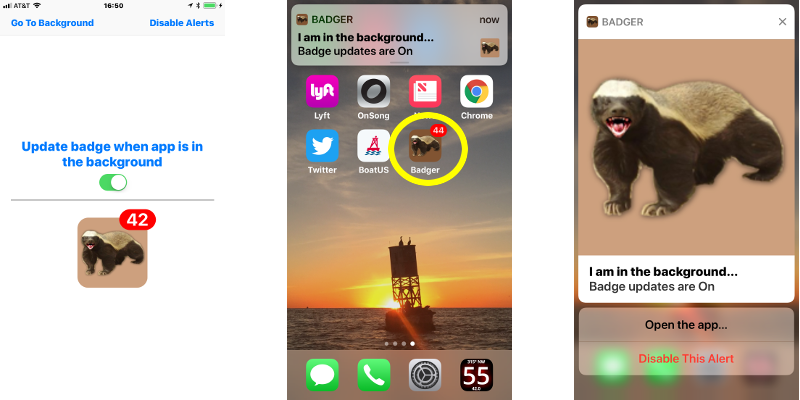
For a GPS/Location Services app that I have released, I needed to warn the user that the app was running in the background. Apps that use the GPS seriously drain the battery. I wanted a way to warn the user WHILE the app is in the background, that it is still running so the user can return to the app or terminate it.
As an experiment, I wrote the Badger App to figure out a good way to achieve this that would work well for my GPS/Location Services app.
When the Badger App goes into the background (user presses Home button), it displays a Local Notification, which appears on the home screen or on top of whatever app the user brings to the foreground. Then in the background, Badger uses a 1 second timer to increment and update the Badger App Icon Badge.
You will need the following to build and run this app:
- Apple Macintosh computer
- Xcode application installed and configured (I used Version 9.2)
- Copy of this repository (click "Clone or Download" on main page) GitHub repo
I selected my iPhones to build and deploy to. I did not try to test in the Xcode simulator.
- iPhone 5 - iOS Version 10.3.3
- iPhone 6+ - iOS Version 11.2.1
- Xcode deployment target - 10.3 (so the app would run on my old iPhone 5...)
There are several "tricks" necessary for the Badger App to work. I spelunked in Stack Overflow to solve some of them, others I developed myself over time:
Extensions.swift - the "Swifty" way
- Return the app icon image
- Create a Notification Attachment containing an image (... the app icon image ...)
ViewController.swift - for display and inits Badger object
- Running in the background (see startLocationManager() function)
- Go to background (save wear and tear on my home buttons (see goToBackground() function)
- Run background function with a Timer (see incrementCounter() function)
- Display simple alert popup (see showAlert() function)
Badger.swift - handle notifications badge setting in the background
- Handling foreground/background transitions (NotificationCenter observers - see viewDidLoad() function)
- Set and Clear the App Icon Badge (UIApplication.shared.applicationIconBadgeNumber variable)
- Run background badge update with a Timer (see startBadgeUpdate() function)
- Local Notifications (see requestNoficationAuthorization() and notify() functions)
There are a few things required in the Info.plist file to get the location services working properly on the iPhone 5 and the iPhone 6+:
- NSLocationWhenInUseUsageDescription - Message to user
- NSLocationAlwaysUsageDescription - Message to user
- NSLocationAlwaysAndWhenInUseUsageDescription - Message to user
- UIBackgroundModes - location
- UIRequiredDeviceCapabilities - armv7, location-services (NOTE: gps was not necessary...)
-
Copy Badger.swift into your project folder
-
Instantiate a Badger object (in ViewDidLoad() or other accessible object)
var badger = Badger() -
Configure your Badger object
badger.enableAlert = true // default = true, Notification will popup badger.enableUpdate = true // default = true, App Icon badge is set and updated badger.enableSound = true // default = true, set to false if it's annoying badger.updateFrequency = 2 // default = 1, update badge every N seconds badger.setTitle("Oy!") // default = "Alert" badger.setSubTitle("Vey!") // default = nil badger.setBody("App is running in the background.\n\n" + "Please watch your battery usage.") // set this as you please // in your background processing loop, set the badge to an integer self.badge.setBadge(42) // default = 0 (which is NO badge) -
Build and deploy your project! That's all you need to do.
-
NOTE: For iOS 10.x and previous, you MUST set the body to something or no message will appear.
-
Minimum usage:
var badger = Badger()
badger.setBadge(1)    // sets the app icon badge to 1
The default notification message body will be set to "YOUR_APP_NAME is running in the background.".
I could not figure out a way to consistently clear the App Icon Badge when the app terminates. If the app was in the foreground it often does work, but if the app is in the background, it very rarely works. I posted a question on StackOverflow.com and the response was that it's not possible. I tried several different approaches. The appWillTerminate functionality does not seem to allow you to set the appIconBadge variable to 0 (zero) before the app terminates. You can try, but it does not work.
This project is licensed under the MIT License: https://opensource.org/licenses/MIT
- Apple Human Interface Guidelines - Notifications And Badging
- HackingWithSwift.com - the best clues were here - Local Notification Tutorial