
A modern, cloud-native file storage & management platform.
Securely upload, organize, share, and access your files from anywhere — built with a type-safe, end-to-end TypeScript stack.





Aset is a full-stack, Google Drive–style file management application. It provides a clean, dashboard-based experience for managing personal files and folders with support for sharing, starring, trash, and more — backed by cloud object storage and a type-safe API layer.
- Secure Authentication — Powered by Clerk with protected dashboard routes.
- File & Folder Management — Create, browse, rename, move, and delete files and nested folders.
- Cloud Storage — Files stored in Cloudflare R2 via presigned URLs.
- Smart Views — Dedicated pages for All Files, Recent, Starred, Shared, and Trash.
- Type-Safe API — End-to-end type safety from database to UI using tRPC + Zod.
- Modern UI — Built with React 19, Tailwind CSS v4, shadcn/ui, and Radix primitives.
- Monorepo Architecture — Clean separation between
frontend,backend, and sharedapitypes.
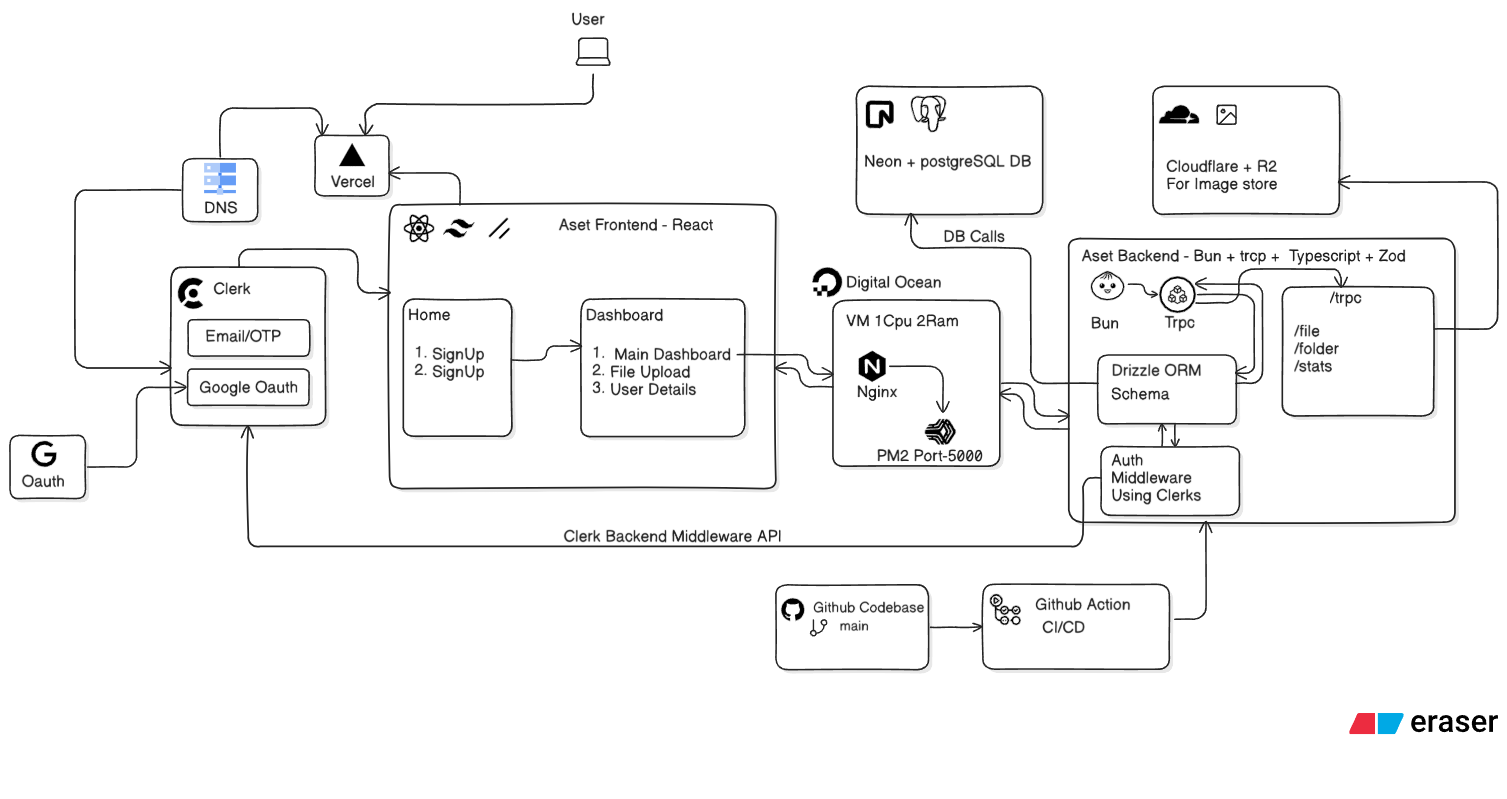
- React 19 + Vite + TypeScript
- Tailwind CSS v4 + shadcn/ui + Radix UI
- TanStack Query + tRPC Client
- React Router v7
- Clerk for auth
- Lucide / Hugeicons for icons
- Node.js + Express 5 + TypeScript
- tRPC server with Zod validation
- Prisma 7 ORM with Neon Postgres
- Clerk Express middleware
- AWS S3 SDK (Cloudflare R2 compatible)
- esbuild for production bundling
- Shared tRPC router types consumed by the frontend for full type safety.
- pnpm workspaces · ESLint · Prettier · Husky · Vercel · Docker · Jenkins
Aset/
├── apps/
│   ├── backend/          # Express + tRPC API server
│   │   ├── src/
│   │   ├── prisma/       # Database schema & migrations
│   │   ├── Dockerfile
│   │   └── Jenkinsfile
│   └── frontend/         # React + Vite client
│       ├── src/
│       │   ├── pages/    # Home, Dashboard, AllFiles, Shared, Recent, Starred, Trash
│       │   └── shared/   # Auth guards, components, utilities
│       └── vite.config.ts
├── packages/
│   └── api/              # Shared tRPC types
├── pnpm-workspace.yaml
├── vercel.json
└── package.json
- Node.js
>= 20 - pnpm
10.33.0(enabled viacorepack) - PostgreSQL database (local or Neon)
- Clerk account for authentication keys
- Cloudflare R2 bucket for object storage
git clone https://github.com/<your-username>/Aset.git
cd Asetpnpm installCreate apps/backend/.env with the following keys:
PORT=5000
DATABASE_URL=postgresql://user:password@host:port/db?sslmode=require

# Clerk
CLERK_SECRET_KEY=sk_test_...
CLERK_PUBLISHABLE_KEY=pk_test_...
CLERK_AUTHORIZED_PARTIES=http://localhost:5173

# Cloudflare R2
R2_ACCESS_KEY_ID=...
R2_SECRET_ACCESS_KEY=...
R2_BUCKET=aset
R2_ENDPOINT=https://<account-id>.r2.cloudflarestorage.com
R2_PUBLIC_BASE_URL=https://<public-url>.r2.dev
Create apps/frontend/.env with your Clerk publishable key and backend URL as needed.
pnpm --filter aset-backend gen     # Generate Prisma client
pnpm --filter aset-backend push # Push schema to databasepnpm devThis runs both apps in parallel:
- Frontend → http://localhost:5173
- Backend → http://localhost:5000
Or run them individually:
pnpm dev:frontend
pnpm dev:backend| Script | Description |
|---|---|
pnpm dev |
Run frontend and backend in parallel |
pnpm dev:frontend |
Run the Vite dev server only |
pnpm dev:backend |
Run the Express API with hot reload |
pnpm build |
Build all workspace packages |
pnpm build:vercel |
Build tailored for Vercel deployment |
pnpm lint / lint:fix |
Lint the entire monorepo |
pnpm format |
Format all files with Prettier |
| Script | Description |
|---|---|
pnpm --filter aset-backend studio |
Open Prisma Studio |
pnpm --filter aset-backend push |
Push schema to database |
pnpm --filter aset-backend pull |
Pull schema from database |
pnpm --filter aset-backend typecheck |
Run TypeScript type checking |
Aset is deployment-ready for multiple platforms:
- Vercel —
vercel.jsonis pre-configured for the frontend. - Docker — A
Dockerfileanddocker-compose.ymlare provided inapps/backend/. - Jenkins — A
Jenkinsfileis included for CI/CD pipelines.
Contributions are welcome! Please follow these steps:
- Fork the repository
- Create a feature branch (
git checkout -b feature/amazing-feature) - Commit your changes (
git commit -m 'feat: add amazing feature') - Push to the branch (
git push origin feature/amazing-feature) - Open a Pull Request
Pre-commit hooks via Husky will automatically run linting and formatting.
Distributed under the ISC License.
Ashutosh Tiwari
If you like this project, please consider giving it a star.