The official template for a Aliucord plugins monorepo.
- A computer. We provide no support for development on mobile devices.
- A minimum of 8GB of RAM (16GB is recommended on Windows)
- Install Git.
- Install Android Studio (VSCode is strongly discouraged)
- Install Java JDK 21 or newer. Example distributions include:
This template includes an example plugin written in Kotlin and Java, demonstrating how to implement a custom command and patches. While we provide backwards compatibility for Java plugins, writing new plugins is recommended to be done with Kotlin, as many new APIs are designed for Kotlin.
To set up your development environment:
- Create your own plugins repository by extending this template:
- Press "Use this template" -> "Create a new repository"
⚠️ Enable "Include all branches" option
- Clone your newly created repository to your local machine with Git.
- Open the cloned repository in Android Studio.
- Open the Gradle build script at plugin/build.gradle.kts, read the
comments and fill out all the placeholders marked with
// TODO - Familiarize yourself with the project structure. Most files contain comments that explain function and purpose.
To test your plugins, there are a few prerequisites:
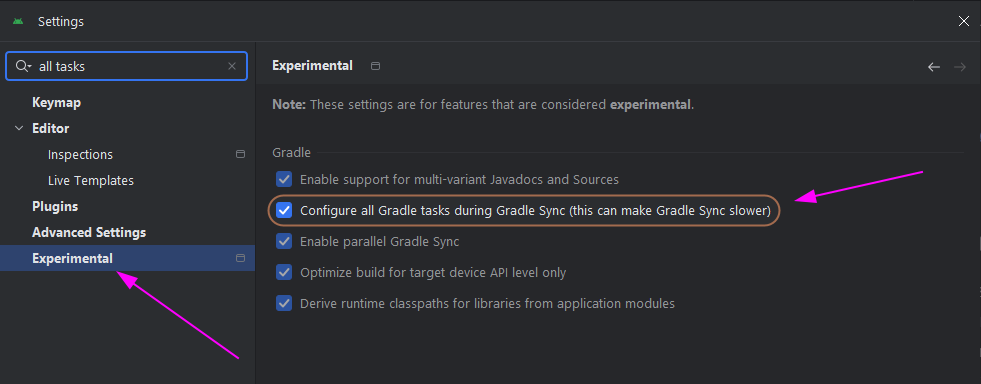
- Enable the "Configure all Gradle tasks during Gradle sync"
option under the "Experimental" tab in Android Studio's settings (Ctrl+Alt+S).
- Sync the Gradle project (Ctrl+Shift+O)
- Open the Gradle tab on the right navbar in Android Studio and locate
the "deployWithAdb" task for the target plugin's project.
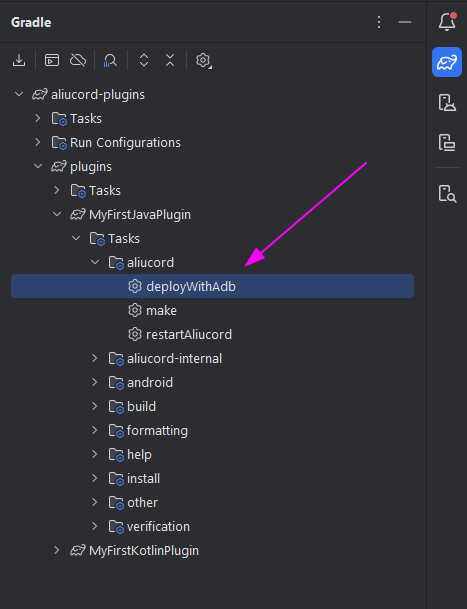
Now that you have located the deployment tasks, prepare your device (or emulator).
- Connect your Android device (or start an x86_64 Android emulator) to your computer.
- Download Aliucord Manager and install Aliucord.
- Launch Aliucord and sign in to a separate Discord account. Using your main account for testing is not recommended!
- Run the
deployWithAdbtask for the plugin you wish to build deploy to your device. If you have not authorized your PC to connect to your device withadbbefore, acknowledge the prompt that appears on your device.
Visit the plugin documentation for more information on writing plugins, or take a look at the source code of existing plugins for examples and inspiration!
-
Ensure you have a
buildsbranch initialized in your Git repository.- If you checked "Include all branches" when cloning this template, then ignore.
-
Enable publishing to your own plugin repository's builds by setting the
deployproperty in your plugin's Gradle buildscript to true:./plugins/MyFirstKotlinPlugin/build.gradle.kts:aliucord { // ... // Excludes this plugin from publishing and global plugin repositories. // Set this to false if the plugin is unfinished deploy.set(true) // ... } -
Create a Git commit with your changes, and push the
mainbranch to Github. Ensure that the Github workflow that builds your plugins succeeds. Your plugins should have been deployed to thebuildsbranch in your repository. -
Join the Aliucord Discord, go to the
#plugin-developmentchannel, and request your plugin repository to be reviewed. If you need additional help in writing plugins, you are welcome to also ask any questions regarding development. -
Once you have received approval, you will be granted permissions to post a plugin listing to the
#plugins-listand#new-pluginschannels. Additionally, create an GitHub issue to submit your plugin repository to internal listings by following the instructions here.
- On Linux & macOS, run
./gradlew :MyFirstKotlinPlugin:maketo build the plugin. Use./gradlew MyFirstKotlinPlugin:deployWithAdbto deploy directly to a connected device. - On Windows, use
.\gradlew.bat :MyFirstKotlinPlugin:makeand.\gradlew.bat MyFirstKotlinPlugin:deployWithAdbfor building and deploying, respectively.
The built plugin will be located at $PLUGIN_DIR/builds/outputs/$PLUGIN.zip. Note
that the builds directory is hidden from the tree view in Android Studio by default.
Everything in this repo is released into the public domain. You may use it however you wish under no warranty. However, we recommend adding the GPL v3 license to your plugins! To do so, copy the license text into a file named "LICENSE" at the repository root.
THERE IS NO WARRANTY FOR THE PROGRAM, TO THE EXTENT PERMITTED BY APPLICABLE LAW. EXCEPT WHEN OTHERWISE STATED IN WRITING THE COPYRIGHT HOLDERS AND/OR OTHER PARTIES PROVIDE THE PROGRAM "AS IS" WITHOUT WARRANTY OF ANY KIND, EITHER EXPRESSED OR IMPLIED, INCLUDING, BUT NOT LIMITED TO, THE IMPLIED WARRANTIES OF MERCHANTABILITY AND FITNESS FOR A PARTICULAR PURPOSE. THE ENTIRE RISK AS TO THE QUALITY AND PERFORMANCE OF THE PROGRAM IS WITH YOU. SHOULD THE PROGRAM PROVE DEFECTIVE, YOU ASSUME THE COST OF ALL NECESSARY SERVICING, REPAIR OR CORRECTION.