An open-source, containerised ROS2 Jazzy stack for autonomous agricultural robotics. This repository provides the drivers and orchestration for the Sowbot platform, featuring RTK-GNSS localisation and ESP32-based hardware control.
Development is led by the Agroecology Lab building on the core developed by Zauberzeug.
Reference open hardware stack(s) under development at Sowbot.co.uk in addition to orginal Zauberzeug Field Friend
Branch: caatinga-dev | ROS 2 Jazzy | Upstream: zauberzeug/feldfreund_devkit_ros
Collaborators welcome. See CONTRIBUTING.md. Contact: sowbot.co.uk
| # | Feature | Description | Status | Phase |
|---|---|---|---|---|
| FOUNDATION | 2025 | |||
| F1 | Containerised deployment | Full ROS 2 Jazzy stack managed via Docker and manage.py. Live volume mapping to /workspace. Build, full-build, and +sim build modes. |
Done | 2025 |
| F2 | Stable device addressing | fixusb.py with Jetson/generic architecture detection, kernel low_latency mode, and udev symlink generation. Writes .env consumed by all launch files. |
Done | 2025 |
| F3 | Teleop dashboard | NiceGUI web cockpit on :80. Three-tab interface: Nav (joystick, e-stop, topo map, node-drop, track mode), Mission (fields2cover corner entry, row plan generator stub, reorderable mission queue), System (telemetry, safety indicators, GPS leaflet map). |
Done | 2025 |
| F4 | ublox DGNSS driver | Dual F9P moving-base configuration with dynamic port assignment via fixusb.py. |
Done | 2026 |
| F5 | Diagnostics TUI | agbot-diagnostic.py terminal status view of all hardware topics. Run inside container via login.sh. |
Done | 2025 |
| MVP FIELD | 2026 | |||
| M1 | AOC platform integration | Demonstrates AOC platform abstraction on affordable ARM hardware accessible to smallholders. | In progress | 2026 |
| M2 | Topological navigation + Nav2 | LCAS topological_navigation (aoc_refactor branch) building in Dockerfile. RViz visualisation confirmed working. Self-contained navigation2.py with A* route planning, explicit state machine, and row_traversal / NavigateToPose / goal_align edge actions. fake_nav2_server simulator enables full pipeline testing without hardware; patched at runtime via manage.py to add /limbic_row_follow stub so row traversal segments complete in sim. Nav2 topic remapping handled via fusioncore (see M2a). Pending: Jazzy field validation. |
In progress | 2026 |
| M2a | fusioncore Nav2 bridge | fusioncore provides the Nav2 topic remapping shim between LCAS topological_navigation and Nav2. Cloned, building in Dockerfile, fusioncore_node launched via devkit.launch.py. Pending: end-to-end test on live hardware. |
In progress | 2026 |
| M3 | Open-field row-crop scenario | Live node-drop workflow in UI: validates name + pose, writes updated YAML to /workspace/maps/, calls switch_topological_map with fallback to direct topic publish. Topo map for maize world auto-generated at container start via get_maize_topo.py (1D k-means on gt_map.csv). Pending: tmap2 authoring from real field survey. |
~50% Done | 2026 |
| M4 | RTK-GNSS localisation | Dual u-blox F9P moving-base configuration. ublox_mb+r_rover publishes /rover/ublox_nav_sat_fix_hp and /rover/ubx_nav_rel_pos_ned (NAV-RELPOSNED heading vector). topic_tools relay bridges fix to /gnss/fix; relposned_heading_shim converts NAV-RELPOSNED to sensor_msgs/Imu on /gnss/heading (ENU radians; publishes only when relPosValid + relPosHeadingValid flags set and baseline ≥ 0.3 m). fusioncore UKF fuses /gnss/fix + /gnss/heading + /odom/wheels → /fusion/odom + odom→base_link. ublox_single.launch.py added for single-receiver development. Pending: antenna lever-arm offset measurement, test on live hardware. |
~70% Done | 2026 |
| M5 | Dual-SBC ROS 2 stack | Both Avaota A1 boards (8× Cortex-A55, T527) run ROS 2 Jazzy with rmw_zenoh_cpp. Static peer Zenoh session over dedicated 1 GbE crossover. Multicast discovery disabled. Pending: zenoh_config.json peer config committed to both repos. |
Planned | 2026 |
| M6 | Gazebo simulation | virtual_maize_field (ros2-gz branch) launches via sowbot_sim.launch.py into Gazebo Harmonic. sowbot_01.xacro (Amiga-NG primitive geometry URDF) spawned into the world. Topo map auto-generated on every container start. sim.launch.py accepts urdf:= arg to select robot model. UI provides native and browser (noVNC) Gazebo launch buttons. fake_nav2_server with /limbic_row_follow stub enables full end-to-end topo nav testing in sim without hardware. |
In progress | 2026 |
| M7 | Sentor safety monitoring | LCAS Sentor topic and node health monitoring. Publishes /safety/heartbeat and /warning/heartbeat. Cloned and building in Dockerfile. Pending: sowbot_monitor.yaml authoring, wiring into devkit.launch.py, smoke-test on live hardware. |
~40% Done | 2026 |
| M8 | Visual crop-row navigation | sowbot_row_follow package (caatingarobotics repo). ExG vegetation index + Otsu threshold, scan-window line fitting, Cherubini & Chaumette visual servoing on Neo SBC. Publishes /aoc/conditions/row_offset, /aoc/conditions/row_heading_error, and /aoc/heartbeat/neo_vision. limbic_row_follow_node.py runs on Limbic as a Nav2 NavigateToPose action server on /limbic_row_follow: Phase 1 enables Neo over the 1 GbE crossover (/row_follow/enable SetBool), monitors Neo heartbeat, visual servo drives /cmd_vel until within row_follow_handover_distance of goal; Phase 2 disables Neo then hands off to Nav2 for final approach and heading alignment. Cancel and heartbeat loss both safely disable Neo before aborting. Camera calibration (camera_height_m, camera_tilt_deg) required before field use. |
~70% Done | 2026 |
| P1 | STM32H7 + copper-rs MCU | Replace ESP32/Lizard DSL with STM32H745 running copper-rs statically-scheduled Rust firmware. Hard real-time motor PID, hardware safety interlocks. | Research | 2027 |
| P2 | CANopen bus | ISO 11898 FDCAN at 500 kbit/s arbitration / 2 Mbit/s data phase. lely-core CANopen master on Limbic T527 native M_CAN peripheral. DSP402 drive profile. | Research | 2027 |
| P3 | RT kernel + core isolation | PREEMPT_RT kernel on the Limbic System (Avaota A1 / T527) running LCAS topological_navigation (aoc_refactor) and Nav2. isolcpus=4-7 with RTK EKF on core 2 (SCHED_FIFO 60), AOC navigation on cores 4-6, watchdog on core 5. GbE/CAN IRQ affinity pinned to core 0. |
Planned | 2027 |
| P4 | ROFS image | Read-only rootfs for the Limbic System. Ubuntu Noble minimal or Yocto with RT kernel, pre-built LCAS topological_navigation (AOC branch), Nav2, and rmw_zenoh_cpp. Immutable field deployment — no colcon build on boot. |
Research | 2027 |
| END-EFFECTORS | TBD | |||
| E1 | Delta weeding module | Open-Weeding-Delta precision mechanical weeding end-effector. CANopen actuator node on delta controller. | Research | TBD |
| E2 | LASER weeding module | Laudando LASER integration and validation on Sowbot. Requires E-Stop interlocking with CANopen safety chain. | Research | TBD |
| DATASETS & COLLABORATION | Ongoing | |||
| D1 | UK open-field dataset | Field imagery and GNSS logs from UK agroecological farm conditions. Published under CC licence for training and benchmarking. | Planned | 2026 |
| D2 | Caatinga biome dataset | Semi-arid row-crop imagery from Brazilian Caatinga conditions contributed by caatingarobotics. Validated on T527 AIPU. | Active | 2026 |
This project is built on and aims to maintain upstream compatibility with zauberzeug/feldfreund_devkit_ros.
High Level navigation is developed from the work of Lincoln Centre for Autonomous Systems (LCAS) as part of the Agri-OpenCore open ROS 2 ecosystem for agricultural robotics.
Perception models, Nav2 stack, datasets and simulation environments are developed in collaboration with caatingarobotics, The Sowbot Jazzy fork is pending upstream merge.
This software is under active development and may be broken at any given moment. For a stable reference implementation see the upstream Zauberzeug project.
THIS SOFTWARE COULD CONTROL PHYSICAL HARDWARE CAPABLE OF PRODUCING SIGNIFICANT KINETIC FORCE.
- EXPERIMENTAL STATUS: This branch ('sowbot') contains experimental code generated and refined with AI assistance. It has NOT undergone full-scale field validation.
- STATUTORY NOTICE (UK): Usage of this software is at the user's sole risk. While standard open-source licenses apply, users are reminded that operating agricultural robotics requires a professional duty of care.
- MANDATORY HARDWARE SAFETY: Under no circumstances should this software be used to control a robot of any size without a independent, hard-wired, physical Emergency Stop (E-Stop) system. Software-based stops (such as /estop/soft) are NOT a substitute for Category 0 or 1 hardware safety stops.
- NO LIABILITY: To the extent permitted by the laws of England and Wales, the contributors exclude all liability for property damage, crop loss, or indirect consequential damages.
This repo may contain traces of LLM slop, We've done our best to mitigate this. If you are allergic to slop, please help us refactor.
Open a terminal on your host machine and download the workspace:
git clone -b caatinga-dev https://github.com/Agroecology-Lab/feldfreund_devkit_ros.git
cd feldfreund_devkit_rosUse the management script to build the ROS 2 workspace and launch the robot stack. This script automatically handles hardware discovery and port permissions:
./manage.py full-build
xhost +local:docker
./manage.py
Access http://localhost to access the WebUI
If you'd like to use Gazebo then add a +sim argument to your build instruction
./manage.py full-build +sim
xhost +local:docker
./manage.py The primary entry point for the system. While it runs the full stack by default, it supports several optional arguments for development:
| Command | Logic / Argument | Resulting Action |
|---|---|---|
./manage.py |
(No arguments) | Runs run_runtime() immediately using live volumes. |
./manage.py build |
build |
Runs run_build(full=False). Re-compiles ROS code. |
./manage.py full-build |
full-build |
Runs run_build(full=True). Cleans system & Re-installs all system dependencies. |
To enter the running container for debugging or manual ROS 2 commands:
./login.shIf hardware is connected but topics are not flowing, run the diagnostic tool from inside the container:
python3 agbot-diagnostic.py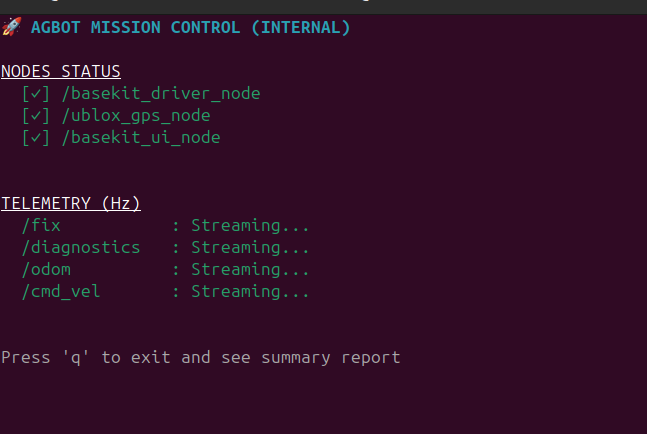
You can also make it verbose with:
python3 agbot-diagnostic.py full- Hardware: ESP32 MCU.
- Software: Lizard DSL.
- Role: Hard Real-Time Execution.
- Function: Motor PID control and physical safety (bumpers/cliffs).
-
I/O: 3.3V UART receiving
$v, \omega$ via theteleop_lizardROS 2 bridge.
- Hardware: Avaota A1 #1 (Allwinner T527).
- Software: ROS 2 Jazzy +
topological_navigation(AOC branch). - Role: Navigation Executive.
- Function: Runs the Topological Navigation stack. UBLOX sensors Manages the move_base sequence and Action on Condition (AOC) logic.
- I/O: Connects to u-blox via USB/UART using
ublox_dgnssnode. Translates graph goals into velocity commands for the Lizard Brain.
<1GbE interconnect between 2&3>
-
Hardware: Avaota A1 #2 (Allwinner T527 + NPU).
-
Software: Dockerised ROS 2 Jazzy.
-
Role: Asynchronous Perception.
-
Function: NPU-accelerated inference (YOLO/Object tracking) and sensor fusion.
-
Connectivity: Native Zenoh integration via
rmw_zenoh_cpp. Publishes environment states and "Conditions" to the Zenoh network.|
- Hardware: STM32 H7 MCU.
- Software: copper-rs.
- Role: Hard Real-Time Execution.
- Function: Manages motor PID loops and hardware-level safety interlocks.
- I/O: Canbus
- Hardware: Avaota A1 #1 (Allwinner T527).
- Software: RT kernel, Buildroot
copper-rs - Role: Deterministic Executive.
- Function: UBLOX sensors, Executes Action on Condition (AOC) logic for topological navigation.
- Data Entry: Directly consumes Zenoh keys from the Neo board to trigger mission state transitions and motion planning.
| Core(s) | Role | Allocation Strategy |
|---|---|---|
| Core 0 | OS / I/O | Handles kernel house-keeping, SSH, and the 1GbE driver interrupts. |
| Core 1 | Zenoh / Neo-link | Dedicated to the Zenoh router and serializing incoming "Nice-to-Have" data. |
| Cores 2-6 | The Pilot (Nav) | This is where the RTK EKF, Path Planner, and Task Graph live. |
| Core 7 | The Bridge (Lizard) | Dedicated to SocketCAN and the high-frequency heartbeat to the STM32 (Lizard). |
<1GbE interconnect between 2&3>
- Hardware: Avaota A1 #2 (Allwinner T527 + NPU).
- Software: Dockerised ROS 2 Jazzy & Dockerised CV packages
- Role: Asynchronous Perception.
- Function: NPU-accelerated inference (YOLO/Object tracking) and sensor fusion.
- Connectivity: Native Zenoh integration via
rmw_zenoh_cpp. Publishes environment states and "Conditions" to the Zenoh network.
(Below from original Zauberzeug forked repo)
Feldfreund DevKit ROS is a comprehensive ROS2 package that handles the communication and configuration of various Feldfreund components:
- Communication with Lizard (ESP32) to control the Feldfreund
- GNSS positioning system
- Camera systems (USB and AXIS cameras)
- Example UI to control the robot
All launch files and configuration files (except for the UI) are stored in the devkit_launch package.
The DevKit driver (based on ATB Potsdam's field_friend_driver) manages the communication with the ESP32 microcontroller running Lizard firmware - a domain-specific language for defining hardware behavior on embedded systems.
The package provides:
config/devkit.liz: Basic Lizard configuration for DevKit robotconfig/devkit.yaml: Corresponding ROS2 driver configuration
Available ROS2 topics:
/cmd_vel(geometry_msgs/Twist): Control robot movement/odom(nav_msgs/Odometry): Robot odometry data/battery_state(sensor_msgs/BatteryState): Battery status information/bumper/front_top(std_msgs/Bool): Front top bumper state/bumper/front_bottom(std_msgs/Bool): Front bottom bumper state/bumper/back(std_msgs/Bool): Back bumper state/estop/soft(std_msgs/Bool): Software emergency stop control/estop/front(std_msgs/Bool): Hardware front emergency stop state/estop/back(std_msgs/Bool): Hardware back emergency stop state/configure(std_msgs/Empty): Trigger loading of the Lizard configuration file
The camera system supports both USB cameras and AXIS cameras, managed through a unified launch system in camera_system.launch.py that handles USB cameras, AXIS cameras, and the Foxglove Bridge for remote viewing.
The USB camera system provides video streaming through ROS2 topics using the usb_cam ROS2 package. Camera parameters can be configured through config/camera.yaml.
The AXIS camera system integrates with the ROS2 AXIS camera driver to support multiple IP cameras with individual streams. Each camera can be configured through config/axis_camera.yaml, with credentials managed through config/secrets.yaml (template provided in config/secrets.yaml.template). The cameras' authentication mode (basic or digest) might need to be configured - see AXIS Camera Authentication section for details.
The visualization system integrates with Foxglove Studio for remote camera viewing, supporting compressed image transport. The Foxglove Bridge is accessible via WebSocket connection on port 8765.
The GNSS system uses the Septentrio GNSS driver with the default config/gnss.yaml configuration. Available topics:
/pvtgeodetic: Position, velocity, and time in geodetic coordinates/poscovgeodetic: Position covariance in geodetic coordinates/velcovgeodetic: Velocity covariance in geodetic coordinates/atteuler: Attitude in Euler angles/attcoveuler: Attitude covariance/gpsfix: Detailed GPS fix information including satellites and quality/aimplusstatus: AIM+ status information
The example UI provides a robot control interface built with NiceGUI, featuring a joystick control similar to turtlesim. It gives you access to and visualization of all topics made available by the DevKit driver, including:
- Robot movement control through a joystick interface
- Real-time visualization of GNSS data
- Monitoring of safety systems (bumpers, emergency stops)
- Software emergency stop control
The interface is accessible through a web browser at http://<ROBOT-IP>:80 when the robot is running.

- Build and run the container:
cd docker
docker-compose up --build- Run in detached mode:
docker-compose up -d- Attach to running container:
docker-compose exec devkit bash- Stop containers:
docker-compose downThe Docker setup includes:
- All necessary ROS2 packages
- Lizard communication tools
- Camera drivers
- GNSS drivers
To access the user interface (UI), follow these steps:
-
Connect to the Robot's Wi-Fi: Join the robot's WLAN network.
-
Open the UI in your browser: Navigate to:
http://<ROBOT-IP>:80(Replace
<ROBOT-IP>with the actual IP address once you have it.)
The system can be started using different launch files:
devkit.launch.py: Launches all componentsdevkit_nocams.launch.py: Launches all components without the camerasdevkit_driver.launch.py: Launches only Feldfreund DevKit drivercamera_system.launch.py: Launches complete camera system (USB + AXIS) and Foxglove Bridgeusb_camera.launch.py: Launches USB camera onlyaxis_cameras.launch.py: Launches AXIS cameras onlygnss.launch.py: Launches GNSS systemui.launch.py: Launches the example UI node
To launch the complete system:
ros2 launch devkit_launch devkit.launch.pyThe AXIS cameras can be configured to use either digest or basic authentication. To check and configure the authentication mode:
- Check current authentication settings:
curl --digest -u root:pw "http://192.168.42.3/axis-cgi/admin/param.cgi?action=list&group=Network.HTTP" | cat- Switch authentication mode (e.g., from digest to basic):
curl --digest -u root:pw "http://192.168.42.3/axis-cgi/admin/param.cgi?action=update&Network.HTTP.AuthenticationPolicy=basic" | catReplace root:pw with your camera's credentials and 192.168.42.3 with your camera's IP address. The authentication mode can be set to either basic or digest. Note that you should always use the --digest flag in these commands even when switching to basic auth, as the camera's current setting might be using digest authentication.
git clone https://github.com/zauberzeug/devkit_ros.git
cd devkit_rosBefore building, check and adjust if needed:
-
ROS2 Configuration (
devkit_launch/config/devkit.yaml):- Verify
serial_portmatches your setup (default: "/dev/ttyTHS0") - Check
flash_parametersfor your hardware (default: "-j orin --nand")
- Verify
-
Lizard Configuration (
devkit_launch/config/devkit.liz):- Verify motor configuration matches your hardware
- Check pin assignments for bumpers and emergency stops
- Adjust any other hardware-specific settings
./docker.sh uOnce the system is running:
- Use the "Send Lizard Config" button in the UI
- Or use the
/configuretopic in ROS2
Check the UI at http://<ROBOT-IP>:80 to control and monitor your robot.
This repository is still work in progress. Please feel free to contribute or reach out to us, if you need any unimplemented feature.
- Complete tf2 frames
- Handle camera calibrations
- Robot visualization