


- Get the latest Server files in the Release Tab
- The lastest version of AMP from Nexus or the specific version you want to host
- Installation of Blade and Sorcery to grab some required files
You can also use the ServerManager made by flex hd.
AMP_Server.exeAMP_Server.pdbNewtonsoft.Json.dllUnity.ResourceManager.dllUnityEngine.CoreModule.dllUnityEngine.PhysicsModule.dllUnityEngine.SharedInternalsModule.dll- Optional:
pluginsfolder
Netamite.dllNetamite.pdbNetamite.Steam.dllNetamite.Steam.pdbNetamite.Unity.dllNetamite.Unity.pdb
AMP.dllAMP.pdb
If you download the mod from nexus or mod.io, you probably need to rename bothZZZ_AMPtoAMP.
Navigate to your installation folder. When inside the folder go to BladeAndSorcery_Data/Managed.
ThunderRoad.dllThunderRoad.Manikin.dll
Note: I won't ship required .dll files of B&S with my server, because i don't own the rights to them, thats why you need to grab them yourself.
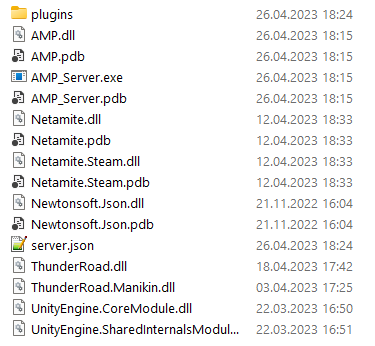
- Get all the files from the step above and put them in the same folder
- Execute the
AMP_Server.exe
3a) On Windows: Just double click the file or run it via the console
3b) On Linux: You must have Mono installed. Just run the file withmono AMP_Server.exe Check that the Mod Version inside of the console is the one you want.
When you start the server for the first time a server.json file will be generated. Inside of there you can configure the server how you want.
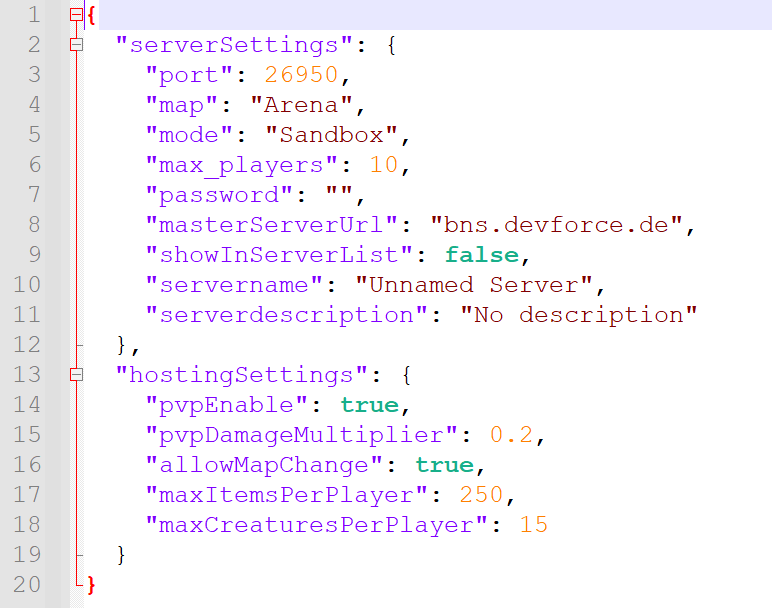
| Tag | Description | Value Type | Default Value |
|---|---|---|---|
port |
The port you wanna use, it will use UDP & TCP | number |
26950 |
map |
The map you want to start the server with | text |
Arena |
mode |
The mode you want to start the server with | text |
Sandbox |
max_players |
Max players that are allowed to be connected at the same time | number |
10 |
password |
Protects the server with that password | text |
none |
masterServerUrl |
The Master Server URL to report to | text |
bns.devforce.de |
showInServerList |
Annouces the server to the serverlist at the address specified in masterServerUrl |
boolean |
false |
servername |
Name to show in the serverlist | text |
Unnamed Server |
serverdescription |
Description to show in the serverlist | text |
No description |
| Tag | Description | Value Type | Default Value |
|---|---|---|---|
pvpEnable |
Toggles PdP (Player damage isnt reliable atm, so its only Player damage Player instead of versus) | boolean |
true |
pvpDamageMultiplier |
Damage Multiplier factor to other players | float |
0.2 |
allowMapChange |
Allows connected players to change the map, otherwise they get kicked | boolean |
true |
maxItemsPerPlayer |
Max concurrent items a player is allowed to spawn (will despawn the oldest one once the limit is reached) | number |
250 |
maxCreaturesPerPlayer |
Same as maxItemsPerPlayer but for creatures |
number |
15 |