This repository will be used to store the files for the ACM CSUF club's second meetup for the GameDev team. The goal for this workshop is to learn about the structure of a Unity 2D game as well as learning the fundamental controls needed to set up a basic platformer.
- Satisfy the requirements:
- A machine that runs Windows 7+, Mac OS X 10.13+, Ubuntu 16.04, 18.04, or CentOS 7
- At least 6 GB of free space
- Clone this repository into any location.
- Download and install Unity Hub.
- Launch Unity Hub, then sign in or create an account as prompted.
- Install Unity Editor as prompted. Make sure version 2021.3.18f1 is being installed.
- Agree to the Personal Edition License as prompted.
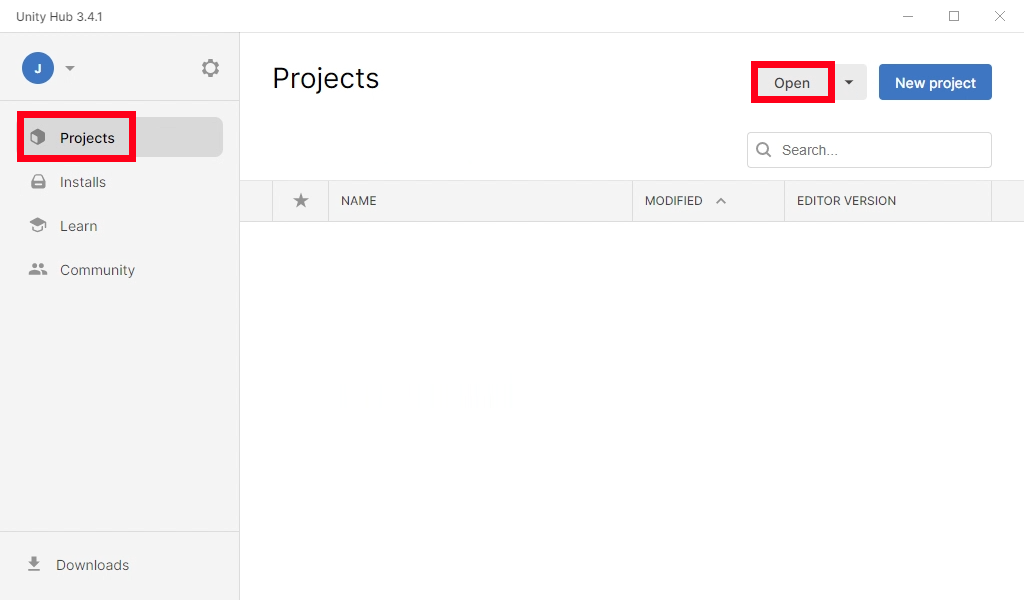
- When Unity Editor is finished installing, go to the "Projects" tab, then click "Open"
!
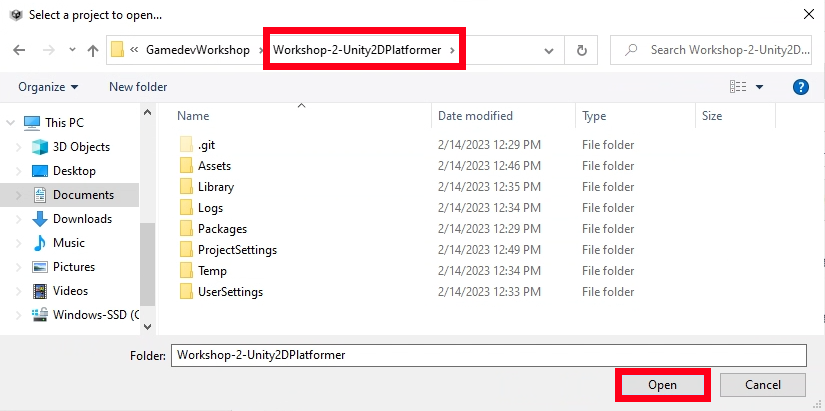
- In the file explorer dialog, nagivate to the directory that this repository was cloned into. Then, hit "Open" once inside
!
- Unity Editor will now open and begin to download the required packages. This may take a little while.
- Once Unity Editor is done initializing the project, it is free to be edited.