
Write your product demo once. Get a polished video every time your UI changes.



☕ scriptreel is free. If it saves you time, please sponsor it.
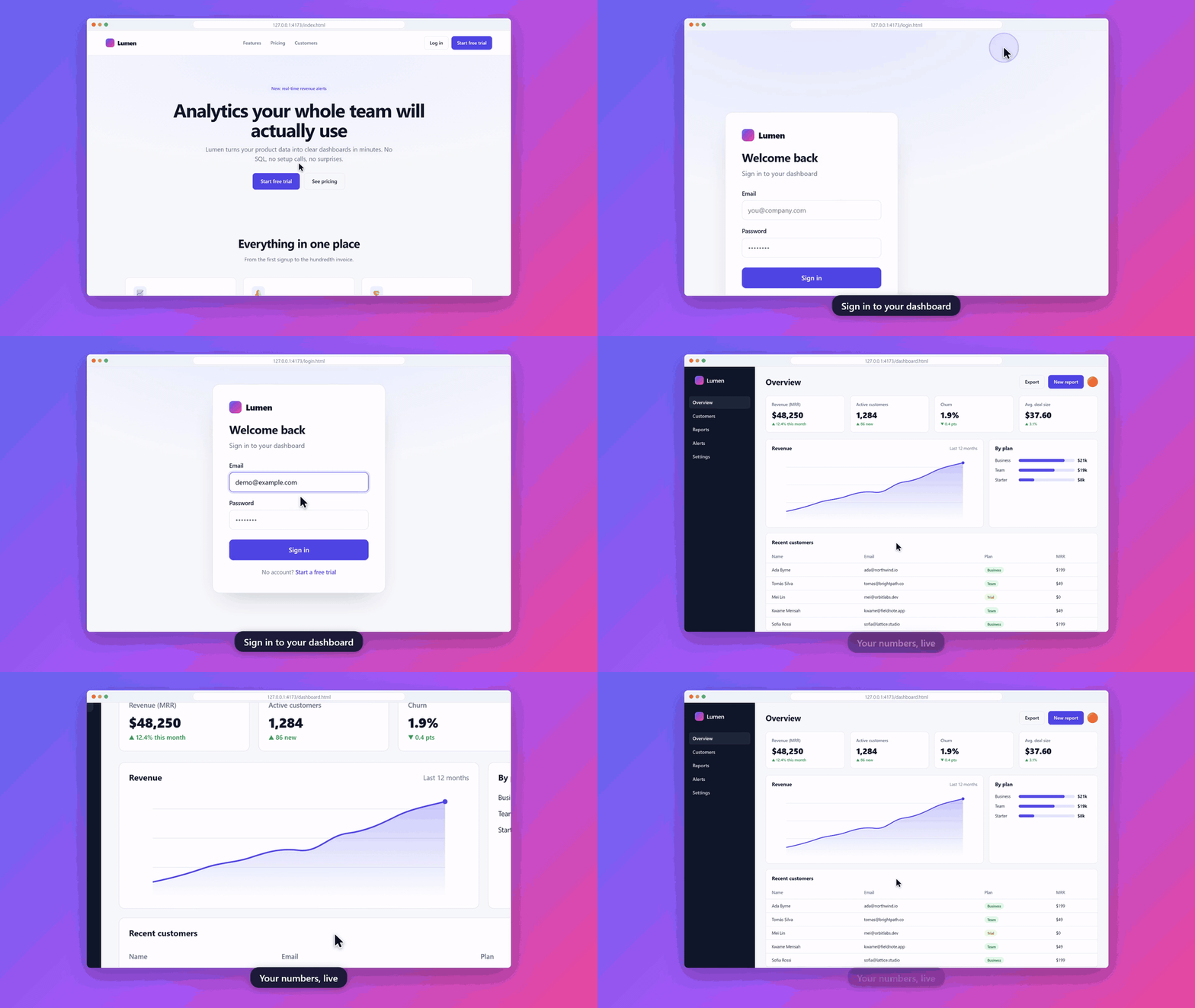
This GIF was rendered by scriptreel from examples/login-flow.yml; the full-quality MP4 is in examples/output.
scriptreel turns a short YAML script into a professional demo video of your web app. It drives a real Chromium browser and renders:
- a smooth animated cursor that glides along natural curves, with click ripples,
- automatic zoom into whatever is being clicked or typed into, easing back out between actions,
- captions, a browser window frame, rounded corners, a soft shadow and a gradient background,
- natural typing with small random variations,
- MP4, WebM and GIF, at any size: YouTube, vertical reels or square.
When your UI changes, re-run the script and the video updates itself. It's an open-source alternative to recording demos by hand with paid screen recorders. There is no server and no account: it runs on your machine or in CI.
▶ See it in action: the live demo website shows each example script next to
the video it produced, and has a script builder that writes a demo.yml for you.
Requirements: Node.js 18.18 or newer, on Windows, macOS or Linux. ffmpeg is bundled, so you don't need to install it. Chromium is downloaded once through Playwright (see below).
Pick whichever way suits you:
# 1. No install: run the latest version with npx
npx scriptreel record demo.yml

# 2. As a dev dependency of your project (recommended for teams and CI: everyone uses the same version)
npm install --save-dev scriptreel
npx scriptreel record demo.yml

# 3. As a global command, available in any folder
npm install -g scriptreel
scriptreel record demo.yml
Then install the browser once:
npx playwright install chromium # on Linux CI: npx playwright install --with-deps chromiumCheck that everything works:
npx scriptreel --version
npx scriptreel init && npx scriptreel validate demo.yml
pnpm (pnpm add -D scriptreel), Yarn (yarn add -D scriptreel) and Bun (bun add -d scriptreel) work too.
npx scriptreel init                          # creates demo.yml
npx playwright install chromium              # once, if you don't have it yet
npx scriptreel record demo.yml -o demo.mp4
A script looks like this:
url: https://app.example.com
viewport: { width: 1440, height: 900 }
steps:
  - caption: "Sign in to your dashboard"
  - click: "text=Log in"
  - type: { selector: "#email", text: "demo@example.com" }
  - type: { selector: "#password", text: "${DEMO_PASSWORD}", hidden: true }
  - click: "button[type=submit]"
  - wait: { selector: ".dashboard" }
  - zoom: ".revenue-chart"
  - scroll: { to: "#pricing" }
  - pause: 1500
Selectors use Playwright locator syntax: CSS (#email),
text (text=Log in), roles (role=button[name="Save"]) and more.
| Key | Type | Default | Description |
|---|---|---|---|
url |
string | required | Page to open first. |
viewport |
{ width, height } |
1440×900 |
Browser viewport in CSS pixels. |
steps |
list | required | The actions to perform, in order. |
size, fps, zoom, theme, background, captions, speed, blur, seed |
Same as the command-line options. Flags on the command line win. | ||
deviceScaleFactor |
number | auto |
auto |
Screenshot resolution. auto keeps text sharp at the strongest zoom. |
Each step has exactly one action. Any step can also have a voiceover: line (see Subtitles).
| Step | Example | What happens |
|---|---|---|
caption |
caption: "Create a report"caption: { text: "Hi", duration: 2000 }caption: null |
Shows a caption until the next caption (or for duration ms). null hides it. Adds a short pause so viewers can read it. |
click |
click: "text=Log in"click: { selector: ".row", double: true, button: right } |
Moves the cursor to the element, clicks with a ripple, and waits for the page to react. |
type |
type: { selector: "#email", text: "a@b.co" } |
Clicks the field and types at a natural speed. Options: hidden: true masks the value in the video and logs, clear: false keeps existing text, submit: true presses Enter afterwards. Leave out selector to type into the focused element. |
hover |
hover: ".menu" |
Moves the cursor over an element. |
select |
select: { selector: "#size", value: "L" } |
Picks an option in a <select>. |
press |
press: "Enter", press: "Control+A" |
Presses a key or shortcut. |
wait |
wait: ".dashboard"wait: { url: "**/welcome" }wait: { state: networkidle }wait: 500 |
Waits in the browser for an element, URL, load state or time. The video only shows a short transition, never the waiting itself. |
zoom |
zoom: ".chart"zoom: { selector: ".chart", scale: 2, duration: 2500 } |
Zooms the camera onto an element, holds, then zooms back out. |
scroll |
scroll: { to: "#pricing" }scroll: { by: 600 }, scroll: { y: 0 }scroll: { to: ".item-40", container: ".list" } |
Smoothly scrolls the page or a scrollable container. |
pause |
pause: 1500 |
Holds the current frame for this many milliseconds. |
goto |
goto: "/settings" |
Opens another URL, relative to the current page. |
Any string can contain ${NAME} (or ${NAME:-default}), filled in from environment variables, so passwords never
sit in the script. Values that come from the environment are replaced with •••••• in the log output. Write $${
for a literal ${.
DEMO_PASSWORD=s3cret npx scriptreel record demo.ymlA .ts (or .js) file that exports the same structure works too, with autocompletion:
// demo.ts
import { defineDemo } from 'scriptreel';

export default defineDemo({
  url: 'https://app.example.com',
  steps: [{ caption: 'Welcome' }, { click: 'text=Get started' }],
});npx scriptreel record <script> [options]| Option | Default | Description |
|---|---|---|
-o, --output <file> |
<script>.mp4 |
Output file; the format comes from the extension: .mp4 (H.264), .webm (VP9) or .gif. |
--format <list> |
Extra formats to write next to the output, e.g. --format webm,gif. |
|
--size <size> |
1920x1080 |
WIDTHxHEIGHT or a preset: youtube (1920×1080), reel (1080×1920), square (1080×1080), 720p, 4k. |
--fps <n> |
30 |
Frames per second. |
--zoom <level> |
subtle |
Automatic zoom: off, subtle (1.4×) or strong (2×). zoom steps work even when this is off. |
--theme <theme> |
light |
Browser frame: light or dark. |
--background <bg> |
aurora |
A preset (aurora, ocean, sunset, mint, midnight, slate, charcoal, white), a color ("#0f172a"), two or more colors for a gradient ("#6366f1, #ec4899") or "linear-gradient(90deg, #a, #b)". |
--no-captions |
Don't draw caption overlays. | |
--blur <selector> |
Blur matching elements in every frame: emails, API keys, customer data. Repeatable. | |
--headed |
Show the browser and watch the demo play in real time. | |
--speed <n> |
1 |
Make cursor movement, typing and pauses faster (2) or slower (0.5). |
--seed <n> |
1 |
Seed for the natural variation in cursor paths and typing. The same seed always gives the same video. |
--scale <n> |
auto | Screenshot device scale factor. |
--timeout <ms> |
15000 |
How long to wait for elements and page loads. |
--no-srt |
Don't write the voice-over .srt file. |
|
--keep-frames |
Keep the captured screenshots for debugging. |
Other commands:
npx scriptreel init [file]        # write an example script (default demo.yml)
npx scriptreel validate demo.yml # check a script without recording--blur ".email"(orblur: [".email", "text=sk_live"]in the script) blurs matching elements in every frame.type: { ..., hidden: true }masks what is typed, in the video and in the logs.- Values from
${ENV_VARS}are never printed.
Add voiceover: to any step and scriptreel writes an .srt file next to the video, timed to the moment that step
plays and long enough to read:
- click: "text=New report"
  voiceover: "Creating a report takes one click."
Use it as subtitles, or as the script for recording narration.
Because the video is generated from a script, your demos can stay current automatically. This workflow re-records them on every release and commits them to the repo:
# .github/workflows/demo-videos.yml
name: Update demo videos
on:
  release:
    types: [published]
  workflow_dispatch:

permissions:
  contents: write

jobs:
  record:
    runs-on: ubuntu-latest
    steps:
      - uses: actions/checkout@v4
        with:
          ref: ${{ github.event.repository.default_branch }}
      - uses: actions/setup-node@v4
        with:
          node-version: 20
      - run: npx playwright install --with-deps chromium
      - name: Record demos
        env:
          DEMO_PASSWORD: ${{ secrets.DEMO_PASSWORD }}
        run: |
          npx scriptreel@latest record demos/login.yml -o docs/videos/login.mp4 --format gif
          npx scriptreel@latest record demos/tour.yml -o docs/videos/tour.mp4
      - name: Commit updated videos
        run: |
          git config user.name "github-actions[bot]"
          git config user.email "41898282+github-actions[bot]@users.noreply.github.com"
          git add docs/videos
          git diff --staged --quiet || git commit -m "docs: update demo videos for ${{ github.event.release.tag_name || 'manual run' }}"
          git push
More details, including recording against a preview deployment, are in docs/github-action.md.
import { record } from 'scriptreel';

const result = await record('demo.yml', {
  output: ['demo.mp4', 'demo.gif'],
  size: 'square',
  zoom: 'strong',
  blur: ['.customer-email'],
});
console.log(result.outputs, result.duration);
record() also accepts a script object. The lower-level pieces (runScript, Compositor, buildCameraTrack,
parseScript, …) are exported too.
- Run. Playwright opens Chromium and runs each step. Before every action, scriptreel reads the target element's bounding box.
- Capture deterministically. Instead of recording the screen in real time, scriptreel keeps a virtual clock. It takes a screenshot whenever the page can change (after each keystroke, on each scroll frame, after clicks) and places it on that clock. Page loads and waiting take zero video time. CSS animations are fast-forwarded, and page changes cross-fade. The same script gives the same video on a fast laptop or a slow CI runner.
- Plan the motion. Cursor moves are eased Bezier curves with timing based on distance. The camera track zooms toward each active element (1.4×–2×), pans between nearby actions and zooms back out in between.
- Composite. Each frame is drawn with @napi-rs/canvas: background, window frame with the live URL, the camera-transformed page, cursor, click ripples and captions.
- Encode. Raw frames stream into ffmpeg (ffmpeg-static is bundled) to produce H.264 MP4, VP9 WebM or a palette-optimized GIF.
- "Chromium is not installed": run
npx playwright install chromium(on Linux CI:--with-deps). - A step fails: the error names the step, and a screenshot is saved as
<output>.error.png. Run with--headedto watch. - Use your own ffmpeg: set
SCRIPTREEL_FFMPEG=/path/to/ffmpeg.
examples/ has three scripts that run against the small site in tests/site:
| Script | Shows |
|---|---|
| login-flow.yml | typing, hidden password from an env var, waiting for navigation, zoom, voice-over |
| form-fill.yml | a full signup form: inputs, <select>, radio cards, checkbox, strong zoom |
| dashboard-tour.yml | dark theme, zoom steps, scrolling, blurred customer emails |
npm run site                                   # serves the test site on http://127.0.0.1:4173
npx scriptreel record examples/form-fill.yml   # in another terminal
# or record all of them at once:
npm run examplesscriptreel is free and MIT-licensed. If it saves you hours of re-recording demos, please consider supporting it. Sponsorship pays for maintenance, new features and fast responses to issues.
| Tier | For | You get |
|---|---|---|
| ☕ Individual, $5/month | Developers and indie hackers | Our thanks, and your name in the supporters list |
| 🚀 Startup, $50/month | Small teams shipping demos in CI | Your name and link in the README, plus priority on issues |
| 🏢 Company logo, $250/month | Companies using scriptreel in production | Your logo at the top of this README and in the docs, plus a direct line for feature requests |
Sign up for any tier at buymeacoffee.com/99proteam. One-off coffees are appreciated too.
Your logo here: become the first sponsor! 💛
Contributions are welcome. See CONTRIBUTING.md and the roadmap.