Marty aren't Doc aren't the only ones who can go back to the future. If you're working with legacy code you can import objects from __future___. This means you can have the functionality of Python 3 in Python2... a nice option for anyone still resisting the winds of change. N.B. you cannot import the __future__ module halfway through a script. This will result in a syntax error.
>>> import sys
>>> sys.version
'2.7.10 (default, Oct 6 2017, 22:29:07) \n[GCC 4.2.1 Compatible Apple LLVM 9.0.0 (clang-900.0.31)]'
>>> 2/3
0
>>> from future import division
>>> 2/3
0.6666666666666666
Need to find out the truth (or truthiness) of an iterable? A quick way is to use 'any' or 'all'. Any will check if there is at least one or more True or truthy elements in N iterable. All will check if all the elements in an iterable are True or truthy. >>> nearly_false_iterable = [0, False, '', None, [], {}, 'Ni!'] >>> all(my_iterable) False >>> any(my_iterable) True >>> >>> nearly_true_iterable = [1, True, 'Hello, world!', object(), ['Spam'], {'eggs'}, ''] >>> all(nearly_true_iterable) False >>> any(nearly_true_iterable) True
If you find yourseactlf using index notation across your variables a lot you may end up with WET code and the same indices hardcoded into lots of places. Instead of this you can use Python's inbuilt slice object. The slice object's __init__ parameters are the same as you'd have in index notation (start, stop, step) and start and step are optional. So instead of writing out the indices multiple timesyou can create a slice object and simply slice with that. >>> my_slice = slice(1, 13, 2) >>> 'Hello, world!'[my_slice] 'el,wrd'
-
#### Pretty please pretty print If you have a large data structure (such as a dictionary) and want to print it in a readable just use the pprint module. It'll try and print everything on one line but if it can't it will split it up into several lines that are all aligned. If you want to force it to print every item on a separate line you can specify the width to be 1. One benefit to pretty print is that it does deep pretty printing. I.e. if you have dictionaries nested inside dictionaries it will pretty print the dictionary and pretty print each dictionary inside it. from pprint import pprint >>> squares_dict = {i: i**2 for i in range(10)} >>> pprint(squares_dict, width=1) {0: 0, 1: 1, 2: 4, 3: 9, 4: 16, 5: 25, 6: 36, 7: 49, 8: 64, 9: 81}
Pretty print is the prettiest way to pretty print something (sorry, that's a lot of pretty in one sentence). It's not, however, the only way of doing it. The standard print function has an 'end' and 'sep' parameter that can be used for similar effect. Using 'sep' and 'end' provides more control than pretty printing and means you can custom print pretty much anything in a readable manner. >>> squares_dict = {i: i**2 for i in range(10)} >>> for k,v in squares_dict.items(): ... print(f'{k}: {v}', end=',\n') ... 0: 0, 1: 1, 2: 4, 3: 9, 4: 16, 5: 25, 6: 36, 7: 49, 8: 64, 9: 81, >>> >>> print(*squares_dict.items(), sep='\n') (0, 0) (1, 1) (2, 4) (3, 9) (4, 16) (5, 25) (6, 36) (7, 49) (8, 64) (9, 81)
Why bother ever leaving the command line when looking for StackOverflow answers? Install the howdoi command line tool and you can type your query from the command line. It will return the top ranked answer by default but accepts optional arguments to return other things like links or full answers. N.B. that it returns the top voted answer but not necessarily the right or most helpful answer. $ howdoi delete a dictionary entry del d[key] $ howdoi --all call a function in python ★ Answer from https://stackoverflow.com/questions/19130958/what-does-it-mean-to-call-a-function-in-python ★ When you "call" a function you are basically just telling the program to execute that function. So if you had a function that added two numbers such as: def add(a,b): return a + b
  you would call the function like this:
  add(3,5)

  which would return 8. You can put any two numbers in the parentheses in this case. You can also call a function like this:
  answer = add(4,7)

  Which would set the variable answer equal to 11 in this case.
Brighten up your python applications with millenial's favourite tool of communication. Install the emojis library and you can 'emojize', 'demojize', count how many emojis are in a string and more >>> import emoji >>> emoji.emojize(':rocket:') '🚀' >>> emoji.emoji_count('🐍 has 👍 libraries') 2
Writing a complicated comprehension? Or maybe just a long literal list, dictionary, or tuple. You could just write it out in violation of PEP8 but there's a reason PEP8 exists. Instead, it's best to split your items on to new lines. This means that if you edit your item you only have to change one line which means that a git diff will show you precisely which line was altered. To further optimise this it's best to include a comma after each item, even the final one. Python doesn't care that your final element has a comma after it but it means if you add another line then only the addition of the new line will show up in your git diff instead of the addition of your new line and modification of the previous line to have a comma added in. >>> avengers = [ ... 'Captain America', ... 'Thor', ... 'Iron Man', ... ] >>> avengers ['Captain America', 'Thor', 'Iron Man'] >>> >>> weapons = { ... 'Thor': 'Hammer', ... 'Iron Man': 'Suit', ... 'Captain America': 'Shield', ... } >>> weapons {'Thor': 'Hammer', 'Iron Man': 'Suit', 'Captain America': 'Shield'}
When comprehensions become long they can very quickly lose their readbility. Luckily, you can split them over several lines although longer list comprehensions probably means you want to be using a loop instead. x = [(n // 2 if n % 2 == 0 else n * 3) for n in range(10) if isPrime(n)] x = [ (n // 2 if n % 2 == 0 else n * 3) for n in range(10) if isPrime(n) ]
-
#### Don't let me be misunderstood Writing a for loop but don't actually care about the item the iterable returns on each loop? Instead of having a needless variable lying around which could lead readers of your code to think "But where do they use 'i'? Is it used somewhere?!" you can use an underscore to denote that it's something you don't care about. You can also do this when doing multiple assignment from variable unpacking to show which bits are unimportant. You can still access anything assigned to the underscore but it is a clear way of showing the values assigned to it aren't used. >>> for _ in range(3): ... print('Hello, world!') ... Hello, world! Hello, world! Hello, world! >>> my_favs = ['Danaerys', 'Khal Drogo', 'Rob Stark', 'Tyrion', 'Tywin', 'Lady the Wolf'] >>> Queen, Dead, *_, Dog = my_favs >>> _ ['Rob Stark', 'Tyrion', 'Tywin']
Numbers like '149530359459' are not easily readable and so normally are written with comma delimiting - '149,530,359,459'. Commas can't be used like that in Python but underscores can. You can put in as many underscores as you like. You can put them in integers and floats. They are equivalent to the number without the underscores but may not evaluate as the same object when using 'is'. This, however, cannot be guaranteed of numbers without underscores and '10 is 10' may evaluate to False unless Python has cached the integer '10' (which it usually does with integers in the range [-5: 257]). >>> my_num_spam_cans = 2_365_789 >>> my_friends_num_spam_cans = 2365789 >>> my_num_spam_cans == my_friends_num_spam_cans True >>> 3.141_592_653_589_79 == 3.14159265358979 True >>> >>> x, y = 256, 257 >>> x is 256 True >>> y is 257 False
You can use '_' to access the last unassigned object in your REPL. >>> [x*x for x in range(3)] [0, 1, 4] >>> _ [0, 1, 4]
-
#### Need a homogenous initialised list? Instead of using a list comprehension you can initialise a list with the same object in the way below >>> ['x'] * 3 ['x', 'x', 'x']
Instead of assigning variables via indexing you can using multiple assignment to unpack an iterable so long as the variable number matchs the iterable length. >>> pokemon = ['bulbasaur', 'charmander', 'squirtle',] >>> grass, fire, water = pokemon >>> grass 'bulbasaur' >>> water 'squirtle'
Only care about the first and last elements of your iterable? You can use the '*' to unpack the middle items. This can be used to unpack the beginning and/or end n items but you can only use one '*'. N.B. everything assigned to the starred variable will be in a list. >>> pokemon2 = ['chikorita', 'cyndaquil', 'totodile',] >>> grass, *others = pokemon2 >>> grass 'chikorita' >>> others ['cyndaquil', 'totodile']
Have a matrix stored as lists? Need to transpose it? Simply use zip! Remember that zip is an iterable too so you don't have to convert it back to a list but I have below for demonstration. >>> my_matrix = [[1, 2, 3, 4], [5, 6, 7, 8]] >>> list(zip(*my_matrix)) [(1, 5), (2, 6), (3, 7), (4, 8)]
What happens if you need to see if a variable's value is an acceptable value for your application ('legal')? Well, you could assign None to the variable but what if None is a legal value too? This could be a problem when you use the dict's .get() method which will return None by default. Instead you could set the .get() method's default to the string 'NONE' but this could still cause problems if you're checking for strings and all strings are legal values. Checking it's a string but not 'NONE' can become clunky. A better solution is to use a sentinel object. This object will have a unique object ID so there is no chance of it overlapping with legal values. >>> MISSING = object() >>> val = my_dict.get(key, MISSING) >>> if val is MISSING: ... #condition here
Lets say you need to implement different functionality based on which version of Python is being used to run your programme. You can use sys.version to check which version is being run. >>> from sys import version >>> version '3.7.3 (default, Mar 27 2019, 16:54:48) \n[Clang 4.0.1 (tags/RELEASE_401/final)]'
If you need to check whether a value is equal to one of several options instead of chaining 'or' conditional operators you can simply check if the value is in a set of the options. >>> weapon = 'Hammer' >>> weapon == 'Shield' or weapon == 'Suit' or weapon == 'Hammer' or weapon == 'Being green' True >>> weapon in {'Shield', 'Suit', 'Hammer', 'Being green'} True
You can define a function signature to only accept keyword arguments for all or some parameters using ''. All parameters to the right of the '' in the signature can only be passed by keyword arguments. >>> def str_concat(pos1, pos2, *, kw1, kw2): ... return f'{pos1} {pos2} {kw1} {kw2}' ... >>> #Using positional and keyword arguments as per function signature >>> str_concat('Monty', 'Python's', kw1='Flying', kw2='Circus') "Monty Python's Flying Circus" >>> >>> #Trying to use positional arguments >>> str_concat('Monty', 'Python's', 'Flying', 'Circus') Traceback (most recent call last): File "", line 1, in TypeError: str_concat() takes 2 positional arguments but 4 were given
PEP 570 has also just been passed (although not yet implemented) which allows the use of '/' to specify all paramters to the left of the '/' can only be passed positionally. I can't demonstrate a working example below but this means the following examples from the PEP documentation will now be acceptable signatures: def name(p1, p2, /, p_or_kw, *, kw): def name(p1, p2=None, /, p_or_kw=None, *, kw): def name(p1, p2=None, /, *, kw): def name(p1, p2=None, /): def name(p1, p2, /, p_or_kw): def name(p1, p2, /):
-
#### Dumb Waiter If you need a simple server (dumb waiter - get it?) then there's a python one line you can run to get yourself up an running. If no port is provided it will default to 8000. $ python -m http.server 8080 Serving HTTP on 0.0.0.0 port 8080 (http://0.0.0.0:8080/) ...
There are a couple of ways to find the minimum value of dictionary. You could use the min function on the dictionary and supply a lambda function as the key to specify key or value for comparison. What about if you have two values that are equal? Well you'd then need to $ >>> from random import random >>> my_dict = { i: round(random(), 3) for i in range(10) } >>> my_dict {0: 0.304, 1: 0.319, 2: 0.915, 3: 0.594, 4: 0.402, 5: 0.517, 6: 0.126, 7: 0.786, 8: 0.853, 9: 0.904} >>> min(my_dict, key=lambda x: my_dict[x]) 6 >>> min(zip(my_dict.values(), my_dict.keys())) (0.126, 6) >>> min(zip(my_dict.keys(), my_dict.values())) (0, 0.304)
If you want to find out how long it takes for something to execute you can use the timeit module. Provide it with a statement and a number of times you wish to execute it and away you go! >>> from timeit import timeit >>> timeit('print("Spam")', number=10) Spam Spam Spam Spam Spam Spam Spam Spam Spam Spam 5.2081000035286706e-05
Lambda functions (anonymous functions) in python are very easy and denoted by the keyword 'lambda' To define an anonymous function write 'lambda' then the arguments you wish to use followed by a colon and then the return expression. Lambdas are best used when the expression is simple. They can be executed like normal functions or (as everything in Python is an object) assigned to variables for later reference. They are typically very useful for when you have a simple function you want to use in another function that takes a function as an argument (e.g. reduce). >>> lambda x : x + 1 <function at 0x1034ac950> >>> (lambda x : x + 1)(5) 6 >>> add_two = lambda x : x + 2 >>> add_two(2) 4 >>> # Calculating the product of the first 10, non-zero squared numbers ... >>> from functools import reduce >>> squares = [x**2 for x in range(1, 11)] >>> reduce((lambda x, y : x*y), squares) >>> 13168189440000
If you have a load of logic that depends on a value and you find your code is rapidly filling up with 'elif' statements then you could consider using a dictionary. Importantly, as functions are objects, dictionaries can store functions mapped to keys. Not only does this provide quick lookup but it also means you only have to edit one line to add or remove new logic. >>> my_commands = { ... 'square' : lambda x : x2, ... 'cube' : lambda x : x3, ... 'double' : lambda x : 2x, ... 'triple' : lambda x : 3x, ... } >>> my_commands[input()]( ... int(input()) ... ) cube 4 64
-
#### Snag a ram! (Anagrams) Need to check if two words are anagrams of each other? Just use the Counter class from collections. >>> from collections import Counter >>> word1 = Counter('astronomer ') >>> word2 = Counter('moon starer') >>> True >>> # Or even more tersely ... >>> Counter('eleven plus two') == Counter('twelve plus one') True
Need to find the remainder and integer divisor of a number? Use the inbuilt function 'divmod'. >>> divisor, modulus = divmod(357, 23) >>> divisor 15 >>> modulus 12
-
#### Private Property: Trespassers will be mangled. Python's general view of objects and classing is that nothing is private and although there are some things you shouldn't access you still can. With great power comes great responsibility etc. The general practice to indicate a variable of a class is private is to use one leading underscore. You can still access these private variables by type the name including the underscore. If, however, you come from the land of languages like Java and really do not trust other developers not to mess with your perfect class then Python can actually protect your variables using a name-mangling algorithm. Using two leading underscores Python will actually mangle the name meaning it cannot (easily) be accessed. There are still ways to access these properties but it is really not recommend. >>> class Shield: ... publicInformation = 'Everyone likes Steve Rogers' ... _privateInformation = "Nick Fury's middle name is Joseph" ... __hiddenInformation = 'Hail Hydra!' ... >>> Shield.publicInformation 'Everyone likes Steve Rogers' >>> >>> Shield._privateInformation "Nick Fury's middle name is Joseph" >>> >>> Shield.__hiddenInformation Traceback (most recent call last): File "", line 1, in AttributeError: 'Shield' object has no attribute '__hiddenInformation' >>> >>> Shield._Shield__hiddenInformation 'Hail Hydra!'
If you need to join strings you can of course use the overloaded '+' operator to add them together. What about if you have a list of strings though? It's not scalable to type out '+' between each element. A neat solution is to use the string method 'join'. Specify the delimiter in your string and then use the join method to specify your iterable. N.B. all of the elements in your iterable must be of the class 'str' (or pre-converted using str() ). Even if they have a str method this will cause a syntax error. >>> TARDIS_travellers = ['Amy Pond', 'River Song', 'Rose Tyler', 'Martha Jones', 'Donna Noble', 'Clara Oswald'] >>> f'The Doctor has travelled with {" and ".join(TARDIS_travellers)}' 'The Doctor has travelled with Amy Pond and River Song and Rose Tyler and Martha Jones and Donna Noble and Clara Oswald' >>> >>>', '.join([i2 for i in range(10)]) Traceback (most recent call last): File "", line 1, in TypeError: sequence item 0: expected str instance, int found >>> >>> ', '.join( [str(i2) for i in range(10)] ) '0, 1, 4, 9, 16, 25, 36, 49, 64, 81'
Want to know from where your Python has sourced a module or package? You can just print it out and see. >>> import math >>> math <module 'math' from '/anaconda3/lib/python3.7/lib-dynload/math.cpython-37m-darwin.so'>
If you're working with data and want to format it into a string, what's the best way to do it? Well, using the modulo ('%') operator is now old-hat and it's better to use the new-style of formatting with '{}' and '.format()'. If you're in Python 3.6 or above, however, you can make use of f-strings. f-strings allow you to interpolate data with curly braces syntax. f-strings are not always the best tool. If you're working with user supplied strings it might be better to use template strings as the other formatting options could introduce secruity vulnerabilities (a user could supply a string which acccess variables). >>> 'This %s method is mostly used in Python %x' % ('old style', 2) 'This old style method is mostly used in Python 2' >>> >>> 'This {1} method came with Python {0} and is {2}'.format(3, 'newer', 'clearer') 'This newer method came with Python 3 and is clearer' >>> >>> version_num, str_type = 3.6, 'f-string' >>> f'The {str_type} was shipped with Python{version_num} and can even evaluate expressions: 152 = {152}' 'The f-string was shipped with Python3.6 and can even do addition: 15**2 = 225' >>> >>> >>> from string import Template >>> templ_string= Template('This is how you do $string_type which are little more $adjective') >>> templ_string.substitute(string_type='template strings', adjective='secure') 'This is how you do template strings which are little more secure'
If you have an iterable and want to pass each element to a function then instead of writing a for loop you can just use an asterisk to unpack the arguments! N.B. this will obviously only work if your function signature has the same number of parameters as your item's length or if the function accepts any number of arguments. >>> people = ['John', 'Terry', 'Eric', 'Terry', 'Michael', 'Graham'] >>> print(*people, sep=', ') 'John, Terry, Eric, Terry, Michael, Graham'
* #### Or else what?! The else keyword turns up in a surprising number of places in Python. It obviously appears in 'if/else' statements but also can be used with a 'for' loop, 'try/except' clauses, and even 'while' loops. It executes when you finish a suite (block) of code normally rather than by using break or return.
You can specify in your function signature that it has a variable number of non-keyword or keyword arguments using '*args' or '**kwargs' respectively. You can even use both together. >>> people = ['John', 'Terry', 'Eric', 'Terry', 'Michael', 'Graham'] >>> def str_concat(*args): ... return ' '.join(args) ... >>> str_concat('a', 'b', 'c') 'a b c' >>> str_concat('a', 'b', 'c', 'd', 'e') 'a b c d e' >>>
If you want to store values mapped to keys you might consider using a class or a dictionary. Even though dictionaries are fairly efficient, using something like a tuple would be quicker. Tuples, however don't map keys to values; named tuples, however, do. You might want to use a named tuple instead of a dictionary or class when you don't need to subclass and want your data type to be immutable. Named tuples also provide more flexibility in accessing values than classes as nt only can you use dot notation but you can also slice the tuple. Named tuples also have the '_asdict' method which can be used to create an OrderedDict object and the '_make' method to make a named tuple from an iterable of the right length. Similarly you can convert a dictionary to named tuple using asterisk unpacking. A nice bit of hidden functinoality is that you can actually alter a named tuple's field using the '_replace' method. >>> from collections import namedtuple >>> Car = namedtuple('Car', 'brand model registration') >>> my_car = Car('Honda', 'Civic', 'DF11GBX') >>> my_car Car(brand='Honda', model='Civic', registration='DF11GBX') >>> >>> my_car.brand 'Honda' >>> >>> ' '.join(my_car[0:2]) 'Honda Civic' >>> >>> my_car_dict = my_car._asdict() >>> my_car_dict OrderedDict([('brand', 'Honda'), ('model', 'Civic'), ('registration', 'DF11GBX')]) >>> >>> my_other_car_list = ['Jaguar', 'E-type', 'TR625LMP'] >>> my_other_car = Car._make(my_other_car_list) >>> my_other_car Car(brand='Jaguar', model='E-type', registration='TR625LMP') >>> >>> my_other_car.model = 'XJ' Traceback (most recent call last): File "", line 1, in AttributeError: can't set attribute >>> >>> my_other_car._replace(model='XJ') Car(brand='Jaguar', model='XJ', registration='TR625LMP')
-
#### Dictionary get What do you do if you want to look up a key in dictionary but you're not sure if it exists? Well if you're happy with exceptions being thrown without being caught you can just look up the key. Otherwise, you'd probably write something using an if statement to check if the key is in the dictionary then return the value if it is and otherwise return some default value. Luckily, you don't have to write such ugly nested statements. You can simply use the dictionary's inbuilt method 'get'. Call get and supply the key you want to find as the first argument and the default value as the second. >>> lotr_chars = dict(frodo='hobbit', gandalf='wizard', legolas='elf', gimli='dwarf', aragorn='man') >>> lotr_chars.get('gandalf', 'unknown') 'wizard' >>> lotr_chars.get('sauron', 'evil eye') 'evil eye' >>> lotr_chars {'frodo': 'hobbit', 'gandalf': 'wizard', 'legolas': 'elf', 'gimli': 'dwarf', 'aragorn': 'man'}
How about if you wanted to not only lookup if a key exists in a dictionary and have a default value returned, but also have non-existent keys added to the dictionary with a value? Just use the 'setdefault' method of the dictionary. It takes the key you are looking up as the first argument and the argument to return and set as the key's value in the dictionary if the key does not exist in the dictionary. This can be very useful if you're making a counter dictionary (instead of using the Counter class from collections). Simply loop through the iterable you're counting and for each element use setdefault to add it to the dictionary with a value of 0 and then incremenet the value by 1. >>> lotr_chars = dict(frodo='hobbit', gandalf='wizard', legolas='elf', gimli='dwarf', aragorn='man') >>> lotr_chars.setdefault('gandalf', 'witch') 'wizard' >>> lotr_chars.setdefault('sauron', 'evil eye') 'evil eye' >>> lotr_chars {'frodo': 'hobbit', 'gandalf': 'wizard', 'legolas': 'elf', 'gimli': 'dwarf', 'aragorn': 'man', 'sauron': 'evil eye'} >>> >>> shopping_list = ['bread', 'eggs', 'bread', 'milk', 'pasta', 'pasta', 'bread', 'popcorn'] >>> shopping_count = dict() >>> for item in shopping_list: ... shopping_count.setdefault(item, 0) ... shopping_count[item] += 1 ... >>> shopping_count {'bread': 3, 'eggs': 1, 'milk': 1, 'pasta': 2, 'popcorn': 1}
If you think using 'setdefault' on your dictionary is messy and you find yourself writing it over and over again you might think 'if only I could set the dictionary to have a default value'. Well, with the defaultdict from collections you can! when initialising your defaultdict you need to provide it with a default_factor; i.e. a callable that returns the default value. You can use an inbuilt callable like 'int' or provide your own using 'lambda'. When you lookup the key in the defaultdictionary it will return the value for the key if it exists, otherwise it will add the key you provided to the dictionary with the default value and then return the default value. N.B. the lambda function you provide does not exhibit closure so you can use it to create a default value which you can vary. >>> from collections import defaultdict >>> shopping_list = ['bread', 'eggs', 'bread', 'milk', 'pasta', 'pasta', 'bread', 'popcorn'] >>> shopping_count = defaultdict(int) >>> for item in shopping_list: ... shopping_count[item] += 1 ... >>> shopping_count defaultdict(<class 'int'>, {'bread': 3, 'eggs': 1, 'milk': 1, 'pasta': 2, 'popcorn': 1}) >>> >>> shopping_prices = defaultdict(lambda: '£1.00') >>> shopping_prices['bread'] '£1.00' >>> shopping_prices['eggs'] = '£0.99' >>> shopping_prices defaultdict(<function at 0x11022bc80>, {'bread': '£1.00', 'eggs': '£0.99'}) >>> >>> shopping_prices = defaultdict(lambda: 1.0 * interest) >>> interest = 1.04 >>> shopping_prices['ham'] 1.04 >>> interest = 1.06 >>> shopping_prices['beef'] 1.06
If you're generating and using a list comprehension once but find that performance is an issue you can consider using a list generator. List generators use the same syntax as list comprehensions but with parentheses instead of square brackets. Generator comprehensions generate the next element in the sequence as and when they need it. This means that the entire sequence is not stored in memory, unlike a list comprehension. I.e. you should consider using generator comprehensions when the range is large or inifinite. Generators lack, however, the list methods and can only be used once so it is not always best to swap a list for a generator. >>> my_small_list = [x2 for x in range(10)] >>> my_small_generator = (x2 for x in range(10)) >>> >>> my_large_list = [x2 for x in range(1_000_000)] >>> my_large_generator = (x2 for x in range(1_000_000)) >>> >>> import sys >>> sys.getsizeof(my_small_list) 192 >>> sys.getsizeof(my_small_generator) 120 >>> sys.getsizeof(my_large_list) 8697464 >>> sys.getsizeof(my_large_generator) 120
-
#### Ordered Dict
You can use round to round a float to a certain number of decimal places. If you don't specify a value it defaults to rounding to the nearest integer. You can also, however, suplpy negative integers to have your number rounded to the nearest ten, hundred, thousand etc. N.B. this will result in a float rather than an integer as round only returns an integer if the rounding index is 0. >>> from math import pi >>> round(pi) 3 >>> round(pi, 3) 3.142 >>> big_pi = pi * 1_000_000 >>> round(big_pi) 3141593 >>> round(big_pi, -3) >>> 3142000.0
-
#### Set it go! Set it go! Both sets and immutability are useful for a pythonista but unfortunately the two don't go together. Frozensets, however, are an inbuilt type which are immutable and have the same functionality as sets (with the exception of any methods that would try to change a set such as 'add' or 'update). As frozensets are immutable they are also hashable which means they can be used as dictionary keys unlike sets. >>> dinosaurs = {'T. rex', 'Triceratops', 'Troodon'} >>> not_dinosaurs = frozenset(['Pterodactyl', 'Dimetrodon', 'Plesiosaur']) >>> creatures = dict() >>> creatures[dinosaurs] = 'Pretty cool' Traceback (most recent call last): File "", line 1, in TypeError: unhashable type: 'set' >>> >>> creatures[non_dinosaurs] = 'Also pretty cool' >>> >>> non_dinosaurs.add('Icthyosaurs') Traceback (most recent call last): File "", line 1, in AttributeError: 'frozenset' object has no attribute 'add'
You can perform set operations on both dictionary keys and items. This is one easy way to check for intersections, unions, etc. between two dictionaries' keys or the tuple of their items. N.B. you can't do this on dictionary values as there is no guarantee that the values are unique. >>> fruit = {'tomato': 'red', 'apple': 'red', 'cucumber': 'green', 'banana': 'yellow', 'orange': 'orange'} >>> veg = {'potato': 'brown', 'cucumber': 'green', 'broccoli': 'green', 'carrot': 'orange', 'tomato': 'red'} >>> fruit - veg Traceback (most recent call last): File "", line 1, in TypeError: unsupported operand type(s) for -: 'dict' and 'dict' >>> >>> fruit.keys() & veg.keys() {'cucumber', 'tomato'} >>> >>> fruit.items() | veg.items() {('cucumber', 'green'), ('banana', 'yellow'), ('orange', 'orange'), ('tomato', 'red'), ('broccoli', 'green'), ('carrot', 'orange'), ('apple', 'red'), ('potato', 'brown')} >>> >>> fruit.keys() ^ veg.keys() {'orange', 'apple', 'banana', 'potato', 'broccoli', 'carrot'} >>> >>> fruit.values() | veg.values() Traceback (most recent call last): File "", line 1, in TypeError: unsupported operand type(s) for |: 'dict_values' and 'dict_values'
What do you do if you need to map multiple values to one key? Simply use a defaultdict (or the setdefault method) and a list as the value. Then all you have to do is append the value to the list. N.B. you don't have to use a list and could of course use whatever data type best suits your needs. >>> from collections import defaultdict >>> avengers_powers = defaultdict(list) >>> avengers_powers['Thor'].extend(['strength', 'lightning', 'rugged voice']) >>> avengers_powers['Iron Man'].extend(['Flight', 'Blasters', 'Wit']) >>> avengers_powers['Captain America'].extend(['Strength', 'Throwing round objects', 'Righteousness']) >>> avengers_powers['Iron Man'] >>> ['Flight', 'Blasters', 'Wit']
-
#### In-place swapping If you come from another programming language and want to swap two variables you might use a temporary variable, assign the first variable value to the temporary variable, the second variable's value to the first variable, and then finally the temporary variable value to the second variable. Messy, right? In python, you can simply use multiple assignment to swap them in one line! >>> spam = 'Monty' >>> eggs = 'Python' >>> spam, eggs = eggs, spam >>> spam 'Python' >>> eggs 'Monty'
-
#### Ternary operators When you have a simple 'if' statement that assigns one of two objects to a variable instead of using a nested 'if' statement you can write a more Pythonic ternary operator. The syntax is '{value1} if {condition} else {value2}. You can use this in the return statement of a function, comprehensions and much more. It's short, concise, and easy to read; beautifully Pythonic! N.B. with great power comes great responsibility and although you can chain multiple if statements together it's not recommended as it becomes unclear. You can mitigate this by splitting onto multiple lines in certain cases (such as comprehensions) but it can still be rather messy. >>> knights = True >>> saying = 'Ni!' if knights else 'Hello, world!' >>> saying 'Ni!' >>> fizz_buzz = ( ... 'fizzbuzz' if (i%3==0 and i%5==0) ... else 'fizz' if i%3==0 ... else 'buzz' if i%5==0 ... else str(i) ... for i in range(1, 101) ... )
How do you concatenate two dictionaries? You can't use the '+' operator without subclassing the dictionary to create two dictionaries you can add by overloading th.... you get the picture. It's messy. Instead you can unpack the two dictionaries (or more) you have into a new dictionary. >>> squares0_10 = {i:i2 for i in range(10)} >>> squares10_20 = {i:i2 for i in range(10, 20)} >>> squares0_20 = squres0_10 + squares10_20 Traceback (most recent call last): File "", line 1, in TypeError: unsupported operand type(s) for +: 'dict' and 'dict' >>> >>> squares0_20 = {**squares0_10, **squares10_20}
Ever find yourself wanting to iterate over an item but also needing to know the index? You might write something like the above and then use indexing to access the value from the iterable. Not very pretty and certainly not fun to read. Luckily the inbuilt function 'enumerate' can help you out of this sticky wicket. Enumerate converts your iterable into a list of tuples where the first iteam in each tuple is the index of the item and the second is the item. It means you can easily unpack it when looping to access both at once! >>> avengers = ['Thor', 'Iron Man', 'Captain America', 'Hawkeye', 'Hulk', 'Black Widow'] >>> for i, avenger in enumerate(avengers): ... print(f'I am {avenger} and my index was {i}') ... I am Thor and my index was 0 I am Iron Man and my index was 1 I am Captain America and my index was 2 I am Hawkeye and my index was 3 I am Hulk and my index was 4 I am Black Widow and my index was 5
-
#### Should it be '==' or 'is'? What's the difference between using '==' and 'is' in your comparisons? The '==' checks for value equality of objects whereas the 'is' checks for identity equality of objects. That is to say, if you have two unique objects which have the same states they will evaluate to true with '==' (because they are equal to each other) but will evalulate to false with 'is' because they are not the same object. Using 'is' is equivalent to using '==' on the ids of the objects. >>> spam = ['Monty', 'Python's', 'Flying', 'Circus'] >>> eggs = spam >>> # Both 'spam' and 'eggs' are pointing to the same object ... >>> spam == eggs True >>> spam is eggs True >>> >>> eggs = list(spam) >>> # 'eggs' is now a new list object that is a copy of 'spam' ... >>> spam == eggs True >>> spam is eggs False >>> id(spam) == id(eggs) False >>> id(spam), id(eggs) (4455779656, 4456529288)
If you have a large chunk of text what's the best way to put it into your code? You could put it all on one line but that's very messy and hard to edit. It also means that if you edit any of the text the whole line will appear in a git diff rather than just the bits you edited. There are two main ways that you can have a large piece of text split across several lines in your editor but still have it evalute to being one string. The most common way is to use triple quotes (like in a docstring). The second way is to use parentheses but be aware that this does not add any spaces between the lines or include line breaks so you will need to write these in yourself. Using triple quotes, however, will include the line breaks in your text which you may or may not want. >>> spam = """I'm a little teapot ... short and stout ... here is my handle""" >>> spam "I'm a little teapot\n\tshort and stout\n\there is my handle" >>> >>> eggs = ('here is my spout' ... ' pick me up and' ... ' pour me out.' ... ) >>> eggs 'here is my spout pick me up and pour me out.'
Need to produce a list, generator, set, or dictionary from an iterable? Typically you might use a for loop but there's a more Pythonic way! You can use a comprehension to produce a list, set, dictionary, or generator without having to write a for loop. It makes it more readable and runs faster than a for loop would. The syntax a of a comprehension is 'operation(item) for item in iterable if condition(item)'. The operation and condition are optional. N.B. using comprehensions is considered more Pythonic than using map or filter and the BDFL wanted to do away with them in Python3. If you're making a generator you surround this in parentheses. If you're making a list use square braces. A dictionary or a set use curly braces and for a dictionary you need to specify the key and value. List comprehensions are powerful tools but can easily be overused and abused (e.g. [print(egg) for egg in spam] which produces an empty list object). If you find your list comprehension is becoming very long you may want to split it over several lines. >>> evens = (i for i in range(100) if i%2==0) >>> next(evens), next(evens), next(evens) (0, 2, 4) >>> >>> squares_sum = sum([i2 for i in range(100)]) >>> squares_sum 328350 >>> >>> cubes = {i: i3 for i in range(10)} >>> cubes {0: 0, 1: 1, 2: 8, 3: 27, 4: 64, 5: 125, 6: 216, 7: 343, 8: 512, 9: 729} >>> >>> non_fizz_buzz = {i for i in range(50) if i%3 and i%5} >>> non_fizz_buzz {1, 2, 4, 7, 8, 11, 13, 14, 16, 17, 19, 22, 23, 26, 28, 29, 31, 32, 34, 37, 38, 41, 43, 44, 46, 47, 49}
If you're currently reversing your strings by using the 'reversed' function and then the 'join' method of strings you'd be better of using slice notation. Slice notation is much faster at string reversion than using the join(reversed) technique. >>> from timeit import timeit >>> timeit('"".join(reversed("Monty Python's Flying Circus likes spam, eggs, and ham."))', number=10_000_000) 14.41905800500001 >>> >>> timeit('"Monty Python's Flying Circus likes spam, eggs, and ham."[::-1]', number=10_000_000) 1.3093665009999995
You can import functionality from later versions of Python with the __future__ module. Importing braces, however, will result in a syntax error Easter egg. >>> from future import braces File "", line 1 SyntaxError: not a chance
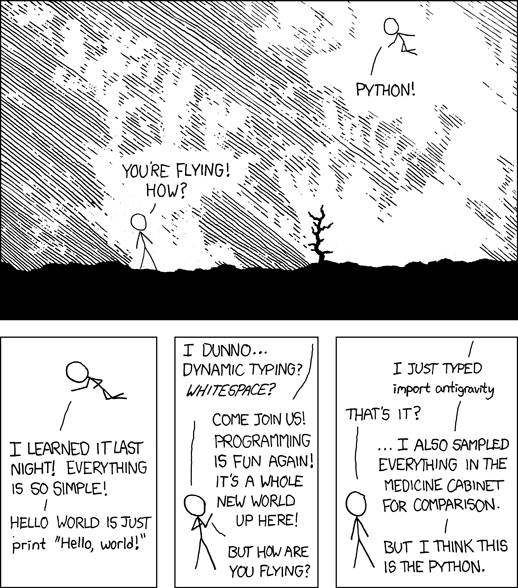
Python is said to have 'batteries included' and has the easiest 'Hello, world!' programme. To really show Python has everything included and just how easy it is the developers included another Easter egg. You can just import it. Just a shame they forgot the comma. >>> import hello Hello world!
Python's incredible standard library means you can probably find anything you need just by importing it.
>>> import antigravity
If you 'import this' you'll find the 'Zen of Python'. These 19 lines are the guiding principles of Python and there's a 20th line reserved for the BDFL (Guido van Rossum) to fill in. It's written by Tim Peters, a major contributor to Python and the namesake of Timsort (Python's sorting algorithm). >>> import this The Zen of Python, by Tim Peters Beautiful is better than ugly. Explicit is better than implicit. Simple is better than complex. Complex is better than complicated. Flat is better than nested. Sparse is better than dense. Readability counts. Special cases aren't special enough to break the rules. Although practicality beats purity. Errors should never pass silently. Unless explicitly silenced. In the face of ambiguity, refuse the temptation to guess. There should be one-- and preferably only one --obvious way to do it. Although that way may not be obvious at first unless you're Dutch. Now is better than never. Although never is often better than right now. If the implementation is hard to explain, it's a bad idea. If the implementation is easy to explain, it may be a good idea. Namespaces are one honking great idea -- let's do more of those!
If you come from another programming language you'll probably have seen the metasyntactic variables 'foo', 'bar', and 'baz' being used. In Python you may see instead 'spam', 'eggs', and 'ham'. As Python received it's name from Monty Python (the British comedy troupe) there are often references to Monty Python by developers. This includes the 'spam', 'eggs', and 'ham' metasyntactic variables and also references to "Terry", "John", knights saying "Ni!" etc.
The term 'BDFL' is frequently use in Python fora to reference the 'Benevolent Dictator For Life', Guido van Rossum. If you don't know who GvR is, he's the main inventor of Python.