Interactive Apache Spark 4.1 learning environment — a VS Code extension with Claude-powered tutoring that turns your IDE into a hands-on Spark classroom.
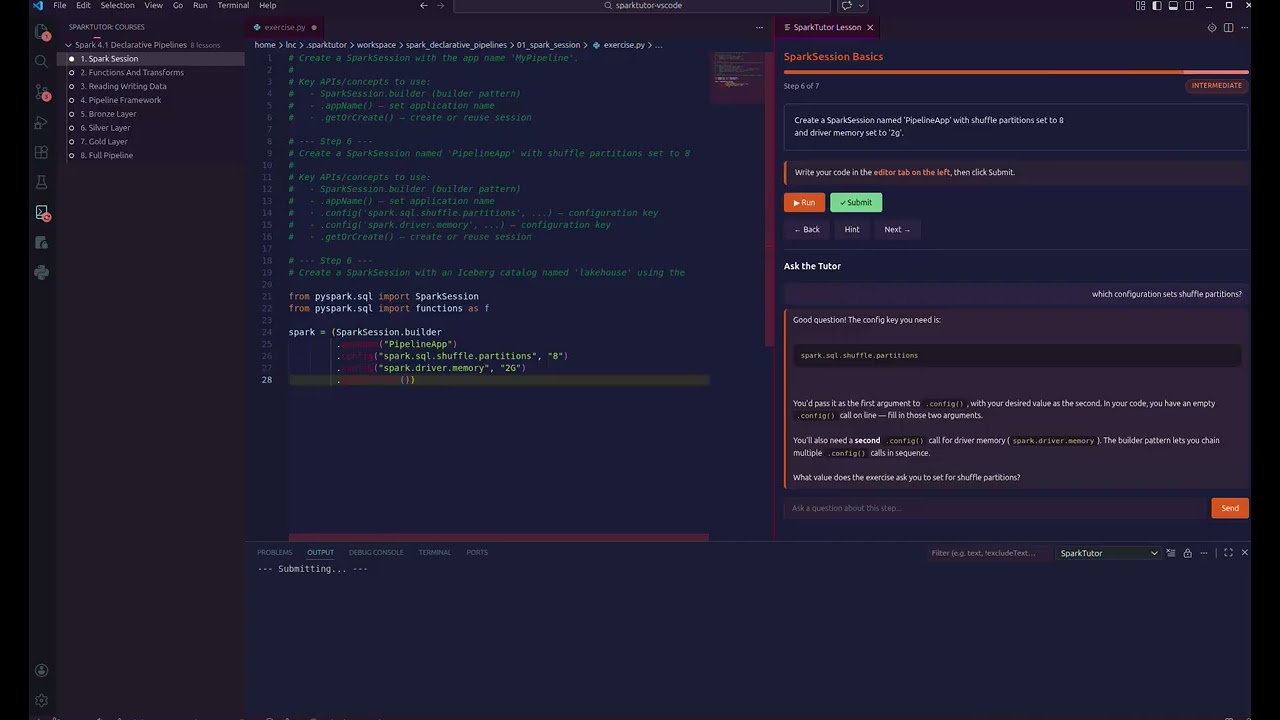
Watch the full demo on YouTube
SparkTutor is a learn-by-doing environment for Apache Spark 4.1. Instead of watching videos or reading docs, you write real PySpark code in VS Code with an AI tutor guiding you through structured lessons — from creating your first SparkSession to building a complete bronze-silver-gold data pipeline.
Key features:
- Real code editor — write PySpark in Monaco with full syntax highlighting, autocomplete, and bracket matching
- Guided lessons — 8 lessons covering SparkSession, transforms, I/O, pipeline framework, bronze/silver/gold layers, and full pipeline assembly
- Depth levels — beginner (skeleton code + TODOs), intermediate (structural hints), advanced (just the objective)
- AI-powered feedback — submit code and get categorized feedback: bugs, conventions, and best practices (via Claude or GitHub Copilot)
- AI tutor chat — ask questions about your code or Spark concepts, grounded in official Spark 4.1 documentation
- Zero-config in Codespaces — works with GitHub Copilot out of the box, no API key needed
- Cumulative exercises — code persists across steps so a SparkSession you build in step 3 is still there in step 7
- Session resume — close VS Code, come back later, pick up where you left off
┌─ VS Code ──────────────────────────────────────────────────┐
│ ┌─ Activity Bar ─┐ ┌─ Editor ──────┐ ┌─ Lesson Panel ───┐ │
│ │ Courses        │ │ (Monaco)      │ │ (Webview)        │ │
│ │  └ Lesson 1 ✓  │ │ from pyspark  │ │ Step 3/8         │ │
│ │  └ Lesson 2 ●  │ │ df = spark... │ │ Create a DF...   │ │
│ │  └ Lesson 3    │ │ df.show()     │ │                  │ │
│ │                │ │               │ │ [Hint] [Submit]  │ │
│ │                │ │               │ │ ── Ask Tutor ──  │ │
│ │                │ │               │ │ > question_      │ │
│ └────────────────┘ └───────────────┘ └──────────────────┘ │
│ ● Lakehouse │ Step 3/8 │ Beginner │ AI: Claude  Status Bar │
└────────────────────────────────────────────────────────────┘
The extension uses a bridge pattern: TypeScript spawns a Python JSON-lines server (python -m sparktutor.server) that wraps the engine layer. Communication is via stdin/stdout — no HTTP, no ports, no configuration.
Click the button below to launch a fully configured environment in your browser — no local install needed:

The Codespace automatically installs all dependencies, builds the extension, and opens the SparkTutor sidebar. If you have a GitHub Copilot subscription, AI-powered code review and chat work out of the box — no API key required.
- VS Code 1.93+
- Python 3.10+
- Node.js 20+ (for building the extension)
# Clone the repo
git clone https://github.com/lisancao/sparktutor.git
cd sparktutor

# Install Python dependencies
pip install -e .

# Build and install the VS Code extension
cd sparktutor-vscode
npm install
bash package-vsix.sh
code --install-extension sparktutor-0.3.0.vsix
Then reload VS Code (Ctrl+Shift+P → "Reload Window").
Open VS Code settings (Ctrl+,) and search for "SparkTutor":
| Setting | Description |
|---|---|
sparktutor.aiProvider |
AI backend: auto (default), anthropic, or copilot |
sparktutor.anthropicApiKey |
Anthropic API key (or set ANTHROPIC_API_KEY env var) |
sparktutor.claudeModel |
Claude model for review/chat (default: claude-sonnet-4-6) |
sparktutor.pythonPath |
Python interpreter path (default: python3) |
sparktutor.projectPath |
Path to sparktutor repo root (auto-detected if installed via VSIX) |
SparkTutor supports multiple AI backends for code review and chat:
| Provider | How to enable | Best for |
|---|---|---|
| Claude (Anthropic) | Set sparktutor.anthropicApiKey or ANTHROPIC_API_KEY env var |
Highest quality feedback |
| GitHub Copilot | Install the GitHub Copilot extension | Codespaces, students with Copilot subscriptions |
| Local only | No API key, no Copilot | Syntax/AST checks still work, no AI review |
In auto mode (default), SparkTutor uses Claude if an API key is set, falls back to Copilot if available, and runs local-only checks otherwise. The active provider is shown in the status bar.
- Click the SparkTutor icon in the activity bar (left sidebar)
- Expand a course and click a lesson
- Choose your depth level (Beginner / Intermediate / Advanced)
- Read the lesson content in the right panel
- Write code in the editor on the left
- Use the buttons or keyboard shortcuts:
| Shortcut | Action |
|---|---|
Ctrl+Shift+R |
Run code |
Ctrl+Shift+S |
Submit for evaluation |
Ctrl+Shift+N |
Next step |
Ctrl+Shift+B |
Previous step |
Ctrl+Shift+H |
Show hint |
| # | Lesson | What you build |
|---|---|---|
| 1 | SparkSession Basics | Create and configure a SparkSession with Iceberg catalog |
| 2 | Functions & Transforms | Master select, filter, withColumn, groupBy, join |
| 3 | Reading & Writing Data | Read CSV/JSON/Parquet, write to Iceberg tables |
| 4 | Pipeline Framework | Build a decorator-based pipeline class with dependency resolution |
| 5 | Bronze Layer | Ingest raw data from Kafka/files with schema enforcement |
| 6 | Silver Layer | Clean, deduplicate, and validate data |
| 7 | Gold Layer | Aggregate and prepare business-ready datasets |
| 8 | Full Pipeline | Wire everything together into a production pipeline |
SparkTutor uses a two-layer evaluation system:
- Local checks (instant) — syntax validation, AST structural checks, exact match
- Claude review (1-3s) — deep code review with categorized feedback
Feedback is categorized as:
- Bug — code won't work or doesn't satisfy the objective (blocks passing)
- Convention — code works but doesn't follow PySpark/Python conventions
- Best Practice — optional improvements (shown at intermediate/advanced levels)
The starter code adapts to your level:
Beginner — full skeleton with imports, structure, and TODO comments:
from pyspark.sql import SparkSession

# TODO: Create a SparkSession using the builder pattern
# Hint: SparkSession.builder.appName(...)
spark = (SparkSession.builder
    # TODO: set your app name and any configs
    .getOrCreate())
Intermediate — concept hints showing what APIs to use:
# Create a SparkSession named 'PipelineApp' with shuffle partitions set to 8.
#
# Key APIs/concepts to use:
#   - SparkSession.builder (builder pattern)
#   - .appName() — set application name
#   - .config('spark.sql.shuffle.partitions', ...) — configuration key
#   - .getOrCreate() — create or reuse session
Advanced — just the objective:
# Create a SparkSession with an Iceberg catalog named 'lakehouse'.sparktutor/
├── src/sparktutor/
│ ├── engine/ # Core tutoring engine
│ │ ├── evaluator.py # Two-layer evaluation (AST + Claude)
│ │ ├── executor.py # Code execution (lakehouse/local/dry-run)
│ │ ├── lesson_runner.py # Lesson state machine
│ │ ├── scaffolding.py # Depth-aware starter code generation
│ │ └── spark_knowledge.py # Curated Spark 4.1 reference
│ ├── server/ # JSON-lines server for VS Code bridge
│ │ ├── handler.py # RPC method dispatch
│ │ └── protocol.py # Request/Response/Notification types
│ ├── courses/ # Course content (YAML + starter/solution files)
│ ├── config/ # Settings (Pydantic models)
│ └── state/ # SQLite progress tracking
├── sparktutor-vscode/ # VS Code extension
│ ├── src/ # TypeScript source
│ ├── media/ # CSS, JS, icons for webview
│ └── package.json # Extension manifest
└── tests/ # 59 tests
# Run tests
PYTHONPATH=src python3 -m pytest tests/ -v

# Build extension (dev mode)
cd sparktutor-vscode && npm run build

# Launch in dev mode (F5 in VS Code)
# Open sparktutor-vscode/ in VS Code, press F5

# Package VSIX
bash sparktutor-vscode/package-vsix.shMIT