Support plan
- which support plan is this issue covered by? (e.g. Community, Core, Plus, or Enterprise): Community
- is this issue currently blocking your project? (yes/no): No
- is this issue affecting a production system? (yes/no): Yes
Context
- node version: 12.18.2
- module version with issue:
"@hapi/hapi": "^19.1.1", "@hapi/inert": "^6.0.1"
- last module version without issue: IDK
- environment (e.g. node, browser, native): node
- used with (e.g. hapi application, another framework, standalone, ...): hapi application
- any other relevant information:
What are you trying to achieve or the steps to reproduce?
I'm defining a custom endpoint named /docs/js which would serve any file in the existent /docs/js directory located at the root path of my project, this is the output of my JSDoc automation routine, so an index.html is served from there and inner CSS/JS should be loaded upon the rendering of that index.
Similarly, I want to do the same to swagger and test coverage, so I would just replicate the same pattern.
Everything works fine, except the redirectToSlash functionality, I did some digging through the plugin source code and if I remove this snippet demonstrated below, the functionality works as expected.

app.js
(async function () {

        const appPort = process.env.APP_PORT || process.env.PORT || process.env.VCAP_APP_PORT || 8080;
	const Hapi = require("@hapi/hapi");
	const vision = require("@hapi/vision");
	const inert = require("@hapi/inert");
	const path = require("path");
	const fs = require("fs");

	let server = Hapi.server(
		{
			"port": appPort,
			"tls": process.env.LOCAL_HTTPS ? {
				"hostname": "localhost",
				"agent": false,
				"key": fs.readFileSync("./root/certificates/local/localhost-privkey.pem"),
				"cert": fs.readFileSync("./root/certificates/local/localhost-cert.pem"),
				"rejectUnauthorized": false
			} : null,
		}
	);

	await server.register(vision);
	await server.register(inert);

	server.route({
		"method": "GET",
		"path": "/docs/js/{param*}",
		"handler": {
			"directory": {
				"path": path.join(__dirname, "/docs", "js"),
				"redirectToSlash": true
			}
		},
	});
}());
Project structure
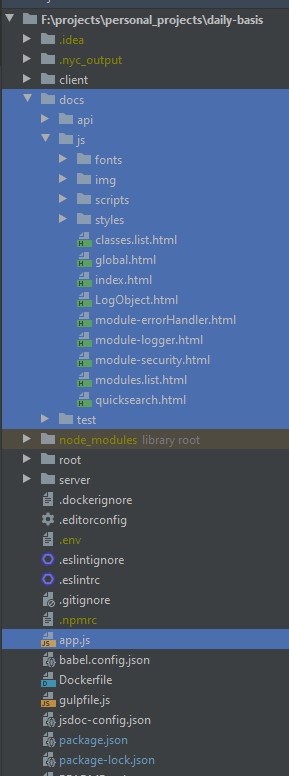
Equivalent express code
const express = require("express");
const app = express();
let server = require("https").createServer(
	{
		"hostname": "localhost",
		"agent": false,
		"key": fs.readFileSync("./root/certificates/local/localhost-privkey.pem"),
		"cert": fs.readFileSync("./root/certificates/local/localhost-cert.pem"),
		"rejectUnauthorized": false
	},
	app
)

app.use("/docs/js", express.static(__dirname + "/docs/js"));
app.use("/docs/test", express.static(__dirname + "/docs/test/lcov-report"));
app.use("/docs/api", express.static(__dirname + "/docs/api/swagger-ui-dist"));
What was the result you got?
- When I access
localhost:port/docs/js I got the index.html and extra css/js can't be loaded.
- When I access
localhost:port/docs/js/ I got the index.html and all extra css/js works smoothly.
- When I access
localhost:port/docs/js the requests are not redirected to localhost:port/docs/js/
What result did you expect?
- Access
localhost:port/docs/js and be redirected to localhost:port/docs/js/ since the redirectToSlash option is set to true.
PS: I validated that:
- That handler is being executed
- No other handler is messing with this one
- If I manually insert the
/ at the end, it works fine
- I did some debugging in the
directory.js code and if I remove/comment the snippet mentioned above, the slash is appended to the URL as expected.
- No change was made to
stripTrailingSlash configuration, the defaults are in place
- I performed some console.log instructions and here is what I got
inert/lib/directory.js line 123
if (internals.isDirectory(error)) {
     console.log(resource);
     console.log(settings);
     console.log(request.server.settings.router.stripTrailingSlash);
     console.log(hasTrailingSlash);
     // more code below
}
- Finally, even though the console.log is showing
/docs/js/, the request in the browser (and also using curl) is not being redirected as expected, as demonstrated below.


Support plan
Context
"@hapi/hapi": "^19.1.1","@hapi/inert": "^6.0.1"What are you trying to achieve or the steps to reproduce?
I'm defining a custom endpoint named
/docs/jswhich would serve any file in the existent/docs/jsdirectory located at the root path of my project, this is the output of my JSDoc automation routine, so an index.html is served from there and inner CSS/JS should be loaded upon the rendering of that index.Similarly, I want to do the same to
swaggerandtest coverage, so I would just replicate the same pattern.Everything works fine, except the
redirectToSlashfunctionality, I did some digging through the plugin source code and if I remove this snippet demonstrated below, the functionality works as expected.What was the result you got?
localhost:port/docs/jsI got the index.html and extra css/js can't be loaded.localhost:port/docs/js/I got the index.html and all extra css/js works smoothly.localhost:port/docs/jsthe requests are not redirected tolocalhost:port/docs/js/What result did you expect?
localhost:port/docs/jsand be redirected tolocalhost:port/docs/js/since theredirectToSlashoption is set to true.PS: I validated that:
/at the end, it works finedirectory.jscode and if I remove/comment the snippet mentioned above, the slash is appended to the URL as expected.stripTrailingSlashconfiguration, the defaults are in place/docs/js/, the request in the browser (and also using curl) is not being redirected as expected, as demonstrated below.