A draft.
This is a step-by-step tutorial for requesting Fishial Recognition on an example fish picture.
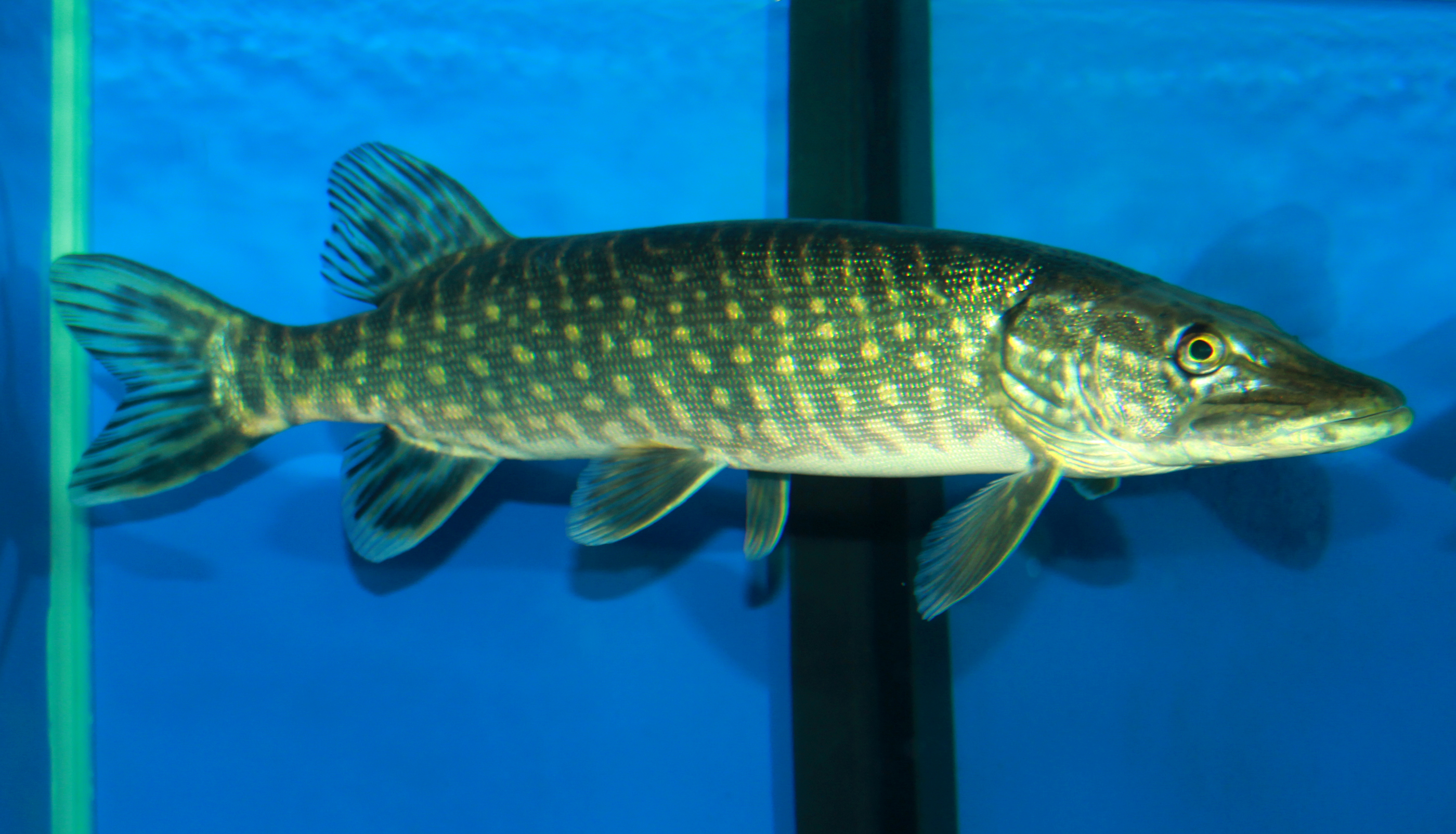

In this tutorial, we’ll show step-by-step how to perform fish recognition on an above picture of a northern pike, which can be downloaded from here: https://raw.githubusercontent.com/fishial/devapi/main/fishpic.jpg
curl "https://raw.githubusercontent.com/fishial/devapi/main/fishpic.jpg" -o fishpic.jpg
In this tutorial, it is assumed that user has a Developers' API subscription and has generated API credentials (API Key Id and API Secret Key).
At first, following information about an image must be gathered: its file name, MIME type, byte size, and MD5 checksum. It is required to upload an image to the cloud.
The picture has been saved as fishpic.jpg, thus its file name is
fishpic.jpg, obviously. (Note: this must be a base name, that is without
a directory path)
A list of common MIME types can be found on Mozilla’s MDN pages:
https://developer.mozilla.org/en-US/docs/Web/HTTP/Basics_of_HTTP/MIME_types/Common_types.
The picture is a JPEG image, hence its MIME type is image/jpeg.
There are several tools to identify image’s MIME type automatically. Perhaps
the most convenient one is a file program that is available on many UNIX-like
systems:
$ file --mime-type -b fishpic.jpg
image/jpeg
A byte size is a number of bytes that given file is composed of.
One way to get this number is wc -c command:
$ wc -c fishpic.jpg
2204455 fishpic.jpg
Finally, an MD5 checksum needs to be calculated for an image. A checksum is required to be Base64-encoded for transport purposes.
There are many ways to get a checksum, for example by using OpenSSL toolkit:
$ openssl dgst -md5 -binary < fishpic.jpg | openssl enc -base64
EA5w4bPQDfzBgEbes8ZmuQ==
In this tutorial, following API credentials will be used.
API Key ID |
c0fae174f24c0950352c2bbd |
API Secret Key |
5edac99f92bf7acb66425c47fb153c5f |
To prevent from abuse, the API key shown in this tutorial has been already deleted. Don’t use it as it won’t work, please use your own instead.
|
Warning
|
Never reveal API Secret Key nor pass it to untrusted machines. |
Now it’s time to get an access token. This is done by sending API credentials
to https://api-users.fishial.ai/v1/auth/token, as illustrated in a cURL
snipped below:
curl --request POST \
  --url https://api-users.fishial.ai/v1/auth/token \
  --header 'Content-Type: application/json' \
  --data '{
    "client_id": "c0fae174f24c0950352c2bbd",
    "client_secret": "5edac99f92bf7acb66425c47fb153c5f"
  }'
The response includes a bearer token that should be used in Authorization HTTP
header in subsequent API calls.
{
  "token_type": "Bearer",
  "access_token": "eyJhbGciOiJIUzI1NiJ9.eyJleHAiOjE2NTY2MTkzNzQsImtpZCI6ImMwZmFlMTc0ZjI0YzA5NTAzNTJjMmJiZCJ9.SwJITJXPcGXu9E6UYPNXq0kTfPRZ_O-qe3FGV7ZTxZM"
}
|
Note
|
The Access Token is valid for 10 minutes and can be passed to client machines without compromising API Secret Key. |
Before we actually upload a picture, we need to get a signed URL that allows us to do so. The request body includes image metadata that were obtained earlier. The signed URL won’t allow a file that doesn’t match that metadata.
curl --request POST \
  --url https://api.fishial.ai/v1/recognition/upload \
  --header 'Accept: application/json' \
  --header 'Authorization: Bearer eyJhbGciOiJIUzI1NiJ9.eyJleHAiOjE2NTY2MTkzNzQsImtpZCI6ImMwZmFlMTc0ZjI0YzA5NTAzNTJjMmJiZCJ9.SwJITJXPcGXu9E6UYPNXq0kTfPRZ_O-qe3FGV7ZTxZM' \
  --header 'Content-Type: application/json' \
  --data '{
    "blob": {
      "filename": "fishpic.jpg",
      "content_type": "image/jpeg",
      "byte_size": 2204455,
      "checksum": "EA5w4bPQDfzBgEbes8ZmuQ=="
    }
  }'
The response is quite lengthy and looks like this:
{
  "id": 1399956,
  "key": "hpleg1o4wez3e7mvy1sivhep9dw6",
  "filename": "fishpic.jpg",
  "content-type": "image/jpeg",
  "metadata": {},
  "byte-size": 2204455,
  "checksum": "EA5w4bPQDfzBgEbes8ZmuQ==",
  "created-at": "2022-06-30T19:53:07.695Z",
  "service-name": "google",
  "signed-id": "eyJfcmFpbHMiOnsibWVzc2FnZSI6IkJBaHBBNVJjRlE9PSIsImV4cCI6bnVsbCwicHVyIjoiYmxvYl9pZCJ9fQ==--269b0ee106c8739e2248645965ad0fc868b20c7c",
  "attachable-sgid": "BAh7CEkiCGdpZAY6BkVUSSJPZ2lkOi8vZmlzaGlhbC1wb3J0YWwtYmFja2VuZC1maXNoZXMvQWN0aXZlU3RvcmFnZTo6QmxvYi8xMzk5OTU2P2V4cGlyZXNfaW4GOwBUSSIMcHVycG9zZQY7AFRJIg9hdHRhY2hhYmxlBjsAVEkiD2V4cGlyZXNfYXQGOwBUMA==--f33ed3bd1d50febd02cd1986655805c71b3699ea",
  "direct-upload": {
    "url": "https://storage.googleapis.com/backend-fishes-storage-prod/hpleg1o4wez3e7mvy1sivhep9dw6?GoogleAccessId=services-storage-client%40ecstatic-baton-230905.iam.gserviceaccount.com&Expires=1656619087&Signature=aMeN%2FVW4I6LDgLRUEW0jzJqeA89gRpjn0TBcGMEnal3RU1iGqe0uOraHainV5qUw6tRPEBRBJ6rMeu9x0AmX6OC3Q8cCCmBUMs4k1jCQOnnCNgkttpU7ov%2FeZ9WpPr47rTQSd5np7jCG3EWVEBhNeP25%2BTx5JlKQQ8UErP%2Bc46Lr%2Bj28wgLw%2BeeVjO4sVjEnLx3djoZD0Htei5XR0YQKVr%2FGDbS4iBOmjPsD5g4txKM6071zft%2BFK6U7I%2FfWjef2w4Nx%2BVvdATkNRpVEzbkAv1lBWMhfrOLy5koJfGepFk0BGQbTXNokhFCQYxzQuJBeC1xubKHzZSQLCVnTXt4EXA%3D%3D",
    "headers": {
      "Content-MD5": "EA5w4bPQDfzBgEbes8ZmuQ==",
      "Content-Disposition": "inline; filename=\"fishpic.jpg\"; filename*=UTF-8''fishpic.jpg"
    }
  }
}
However, only a few entries are important for us.
signed-id-
Will be used at the last step.
direct-upload.url-
A URL that picture should be submitted to.
direct-upload.headers-
A set of headers that should be set when uploading an image.
Having a signed URL (i.e. direct-upload.url from the previous step), we may
actually send an image to that URL. Please note that the request method is
PUT, not usual POST:
curl --request PUT \
  --url 'https://storage.googleapis.com/backend-fishes-storage-prod/hpleg1o4wez3e7mvy1sivhep9dw6?GoogleAccessId=services-storage-client%40ecstatic-baton-230905.iam.gserviceaccount.com&Expires=1656619087&Signature=aMeN%2FVW4I6LDgLRUEW0jzJqeA89gRpjn0TBcGMEnal3RU1iGqe0uOraHainV5qUw6tRPEBRBJ6rMeu9x0AmX6OC3Q8cCCmBUMs4k1jCQOnnCNgkttpU7ov%2FeZ9WpPr47rTQSd5np7jCG3EWVEBhNeP25%2BTx5JlKQQ8UErP%2Bc46Lr%2Bj28wgLw%2BeeVjO4sVjEnLx3djoZD0Htei5XR0YQKVr%2FGDbS4iBOmjPsD5g4txKM6071zft%2BFK6U7I%2FfWjef2w4Nx%2BVvdATkNRpVEzbkAv1lBWMhfrOLy5koJfGepFk0BGQbTXNokhFCQYxzQuJBeC1xubKHzZSQLCVnTXt4EXA%3D%3D' \
  --header 'Content-Disposition: inline; filename=\"fishpic.jpg\"; filename*=UTF-8'\'''\''fishpic.jpg' \
  --header 'Content-Md5: EA5w4bPQDfzBgEbes8ZmuQ==' \
  --header 'Content-Type:' \
  --data-binary @fishpic.jpg
There is an empty response body on successful request, and an error message otherwise.
You need to be very careful when setting headers for the request. Actually,
you should only set headers that were returned along with an upload URL
(i.e. in direct-upload.headers in the previous step), here
Content-Disposition and Content-Md5. Extra headers often lead to signature
rejection, though some (e.g. Accept) are safe to use.
Some tools tend to add some standard headers on their own. For example,
cURL sets Content-Type to application/x-www-form-urlencoded by default,
and this must be overridden. Note that setting this header to image/jpeg
wouldn’t work either, despite this is a JPEG file indeed, because it wasn’t
included in direct-upload.headers.
A Content-Disposition header value in the above example may look odd, but it’s
only due to Bash escaping. In fact, there are only two single quotes between
UTF-8 and fishpic.jpg, as returned from the previous request.
Then actual fish recognition may be performed. There is only one query
parameter q that is set to signed-id returned along with an upload URL.
curl --request GET \
  --url 'https://api.fishial.ai/v1/recognition/image?q=eyJfcmFpbHMiOnsibWVzc2FnZSI6IkJBaHBBNVJjRlE9PSIsImV4cCI6bnVsbCwicHVyIjoiYmxvYl9pZCJ9fQ%3D%3D--269b0ee106c8739e2248645965ad0fc868b20c7c' \
  --header 'Authorization: Bearer eyJhbGciOiJIUzI1NiJ9.eyJleHAiOjE2NTY2MTkzNzQsImtpZCI6ImMwZmFlMTc0ZjI0YzA5NTAzNTJjMmJiZCJ9.SwJITJXPcGXu9E6UYPNXq0kTfPRZ_O-qe3FGV7ZTxZM'
The response is quite lengthy, and it was redacted for clarity:
{
  "results": [
    {
      "shape": { <redacted> },
      "species": [
        {
          "name": "Esox lucius",
          "accuracy": 1.0,
          "fishangler-id": "2a8d971e-de97-4295-8701-b4ea1a8f4da1",
          "fishangler-data": <redacted>
        },
        {
          "name": "Esox masquinongy",
          "accuracy": 0,
          "fishangler-id": "b9db34f3-4edb-4d6e-8fc6-f6588ca20299",
          "fishangler-data": <redacted>
        },
        {
          "name": "Salvelinus fontinalis",
          "accuracy": 0,
          "fishangler-id": "95672e98-93fa-4c16-b119-e384e6527424",
          "fishangler-data": <redacted>
        },
        {
          "name": "Sander vitreus",
          "accuracy": 0,
          "fishangler-id": "b1d261d9-eca8-4fdd-ae09-ca5257babf1b",
          "fishangler-data": <redacted>
        }
      ]
    }
  ]
}
Its structure reads as follows:
-
The
resultsarray contains fish shapes that were recognized on given image. -
The
results[n].shapeis a sequence of points that given fish shape consists of. -
The
results[n].speciesis an array of species that were matched, withaccuracysubfield indicating match probability (0 is the lowest, 1 is the highest).
In this case, results array contains only one item, and one of the matched
species has accuracy 1.0. That means that according to Fishial AI, there’s
only one fish on a picture, and it’s a pike (Esox lucius), which is correct.
Finally, a user may wish to send a feedback agreeing with a recognition result:
curl --request POST \
  --url https://api.fishial.ai/v1/ai-feedbacks/44062/entries \
  --header 'Authorization: Bearer eyJhbGciOiJIUzI1NiJ9.eyJleHAiOjE2NTY2MTkzNzQsImtpZCI6ImMwZmFlMTc0ZjI0YzA5NTAzNTJjMmJiZCJ9.SwJITJXPcGXu9E6UYPNXq0kTfPRZ_O-qe3FGV7ZTxZM' \
  --header 'Content-Type: application/json' \
  --data '{
    "data":{
      "type": "ai-feedback-entries",
      "attributes": {
        "polygon-id": "0",
        "feedback-type": "Agree"
      }
    }
  }'
Or disagreeing with it:
curl --request POST \
  --url https://api.fishial.ai/v1/ai-feedbacks/44062/entries \
  --header 'Authorization: Bearer eyJhbGciOiJIUzI1NiJ9.eyJleHAiOjE2NTY2MTkzNzQsImtpZCI6ImMwZmFlMTc0ZjI0YzA5NTAzNTJjMmJiZCJ9.SwJITJXPcGXu9E6UYPNXq0kTfPRZ_O-qe3FGV7ZTxZM' \
  --header 'Content-Type: application/json' \
  --data '{
  "data":{
    "type": "ai-feedback-entries",
    "attributes": {
      "polygon-id": "0",
      "feedback-type": "Disagree",
      "suggested-name": "Sander vitreus"
    }
  }
}'
Where:
-
polygon-idis an item index in the recognition’sresultsarray (starting with 0) that this user feedback refers to. It also may benullwhen a feedback doesn’t refer to any specific fish shape in the results list but to an image as whole, e.g. when there’s some undetected fish on a picture or a picture doesn’t actually show any fish. -
feedback-typeis one ofAgree,Disagree, orUnknown, and means if a user agreed with recognition result or not. -
suggested-nameis a species name suggested by a user (makes sense only for aDisagreefeedback type).