I recently discovered with some oddly named files that included numbers & capitalization that the interactive-universal-renamer does not use the same file ordering conventions as Windows Explorer when renaming FILES
As you can see in the photo in the link, the list of files is sorted differently in the interactive-universal-renamer than it is in Windows Explorer which is very problematic since the renamed files dont match and essentially link ot the wrong files once the assets are renamed:
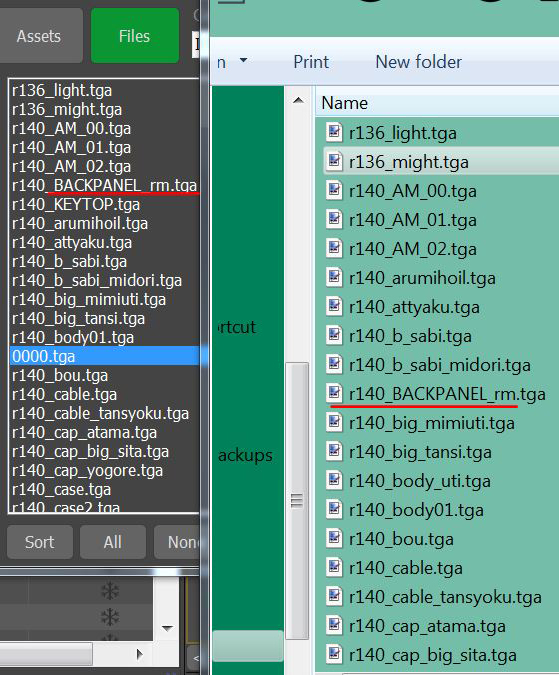
As you can see, by arranging the files by name in Windows get this:
r136_light.tga
r136_might.tga
r140_AM_00.tga
r140_AM_01.tga
r140_AM_02.tga
r140_arumihoil.tga
r140_attyaku.tga
r140_b_sabi.tga
r140_b_sabi_midori.tga
r140_BACKPANEL_rm.tga...
whereas in the interactive-universal-renamer we get:
r136_light.tga
r136_might.tga
r140_AM_00.tga
r140_AM_01.tga
r140_AM_02.tga
r140_BACKPANEL_rm.tga
r140_KEYTOP.tga......
It seems the interactive-universal-renamer is prioritizing the order by number, capitalization, then alphabetical which is not the file ordering system used by windows.
EDIT - A workaround is to simply rename the capitalized files manually in Windows Explorer and reload the scene. This method does not break the link to the file and the script seems to read the order correctly afterwards. If there were hundreds of files with capitalized names this method would be impossibly tedious.

I recently discovered with some oddly named files that included numbers & capitalization that the interactive-universal-renamer does not use the same file ordering conventions as Windows Explorer when renaming FILES
As you can see in the photo in the link, the list of files is sorted differently in the interactive-universal-renamer than it is in Windows Explorer which is very problematic since the renamed files dont match and essentially link ot the wrong files once the assets are renamed:
As you can see, by arranging the files by name in Windows get this:
r136_light.tga
r136_might.tga
r140_AM_00.tga
r140_AM_01.tga
r140_AM_02.tga
r140_arumihoil.tga
r140_attyaku.tga
r140_b_sabi.tga
r140_b_sabi_midori.tga
r140_BACKPANEL_rm.tga...
whereas in the interactive-universal-renamer we get:
r136_light.tga
r136_might.tga
r140_AM_00.tga
r140_AM_01.tga
r140_AM_02.tga
r140_BACKPANEL_rm.tga
r140_KEYTOP.tga......
It seems the interactive-universal-renamer is prioritizing the order by number, capitalization, then alphabetical which is not the file ordering system used by windows.
EDIT - A workaround is to simply rename the capitalized files manually in Windows Explorer and reload the scene. This method does not break the link to the file and the script seems to read the order correctly afterwards. If there were hundreds of files with capitalized names this method would be impossibly tedious.