
Yet another object oriented JS library. This implementation of Object Oriented design in JavaScript is meant to be an experiment, and as such is not intended for production usage yet. The underlying goal of oo.js is to allow package and class access/construction that more closely resembles a "classical" OO structure. This means that classes and packages are created in isolated scopes, and using them (via a require() call) is also isolated within its own scope. The main oo.js script exposes a handful of functions to help achieve this.
Please note, the readme is currently out of date! I am working to update it.
7/21/15
- Added static() in order to create methods on the prototype. Static is self aware, so using the self keyword is allowed
5/6/15
- Classes are now fully setlf and package aware (self.className, self.package)
- Added support for function stubbing to help with development. Stubs issue a warning, but otherwise do not fail. This can be contrasted with an abstract function that will error out if called.
- Added new example in examples/dom_elements. This example provides a super basic set of HTML dom classes and an example of their usage to build a super simple blogging like page with a navbar.
- Added full support for the define and extend functions to take arbitrarily many packages in its call so that you no longer have to invoke an internal requires() call.
4/25/15
- Added support for getter/setter generation within class definitions
- r() creates public getters for a set of variable (ex: r("x", "y", "z") will create class.getX(), class.getY(), and class.getZ() getters
- w() creates public setters for a set of variables (ex: w("x", "y", "z") will create class.setX(), class.setY(), and class.setZ() setters
- rw() creates both getters and setters
- require is now package aware, invoking within the local package if desired
- starting to add support for class reflection so we don't have to use the full package name for a class in a different package
- added support for abstract functions
- added a new example in examples/shape_example.html
- package( path, [func] ) - makes a package or executes within a package's scope
- path - the path of the package (ex: "org.sample.statechart" )
- [func] - the function to execute within the package scope
- extend( class, def) - extends the class scope with def
- class - the class to extend. This can either be a string name (if executed in the package scope) or a direct reference to the class. Extension will define a new class that is a chain of the extended and extending classes. This means that the private scope of class will not be exposed to def, leaving def only with access to the protected and public scopes.
- def - the definition of the new class to use. This must be a named function.
- inherit( class, def) - creates def within the class scope
- class - the class to inherit. This can either be a string name (if executed in the package scope) or a direct reference to the class. Inheritance will define a new class that is a union of the inherited and inheriting classes. This means that all of the inner workings of class are exposed to def directly as though they are in the same scope (ie, def can see any vars declared in class). This means that all three scopes (private, protected, and public) will be shared between class and def.
- def - the definition of the new class to use. This must be a named function.
- require( path..., func) - runs a function within a scope that is built out of all of the required packages
- path... - this is a variable length argument. Paths that are passed in can either be direct (ie: org.example.test_pkg) or by string reference (ie: "org.example.test_pkg"). You can include as many paths as you want, and all of their public scopes will be injected into func.
- func - the function to execute. This function will have direct access to all of the internal classes in the various paths passed in. Name collision is handled in a last-one-wins manner.
- type( type, obj) - Tests whether or not obj is the expected type. If not an exeception will be thrown
- type - string or object definition of the type to require an object to be. This does not yet support inheritance or extension.
- obj - the object to test.
Inheritance can be thought of as meaning "I am x, but with fundamental differences." While extension can be thought of as "I am fundamentally x, but with additions." Here's a quick reference image to give an explanation of the difference between the two in oo.js:
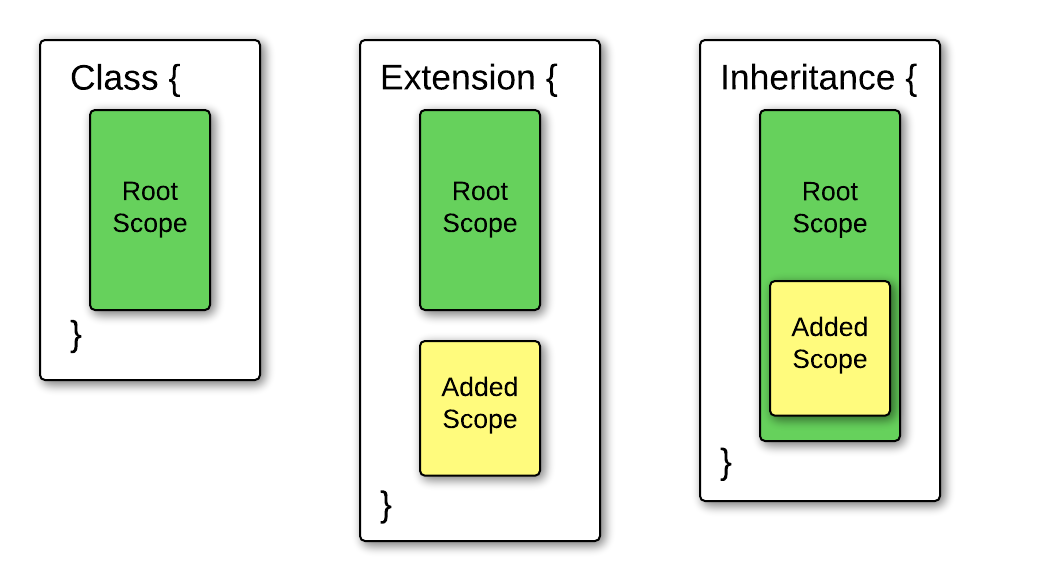
In the extension block, we can see that the root scope and added scope are isolated from each other. They share the protected ($this) and public (this) scopes for the class, but do not share the private scope. In the inheritance block, we can see that the root scope and added scope are ultimately merged together. They share all three scopes: public (this), protected ($this), and private (var and function definitions).
The package function provides a simple way to declare/access a package and its classes. We also provide internal class, extend, and inherit functions for convenience in order to maintain package scopes.
This following is an example of a simple class declaration in the org.example.animal package.
package("org.example.animal", function(){

  /**
   * Animal provides a basic framework for other critter types
   */
  define(function Animal(name){
    // Private scope!
    var type,
      move;

    // Protected scope!
    $self.someProtectedVariable = "this is protected and not public!"

    // Public scope!
    self.move = function() {
      console.log(move);
    };

    self.speak = function() {
      console.log(speak);
    };

    self.identify = function() {
      console.log("I'm " + name + " and I'm a(n) " + type);
    };

  });

});
This will result in the org.example.animal package being created if it doesn't already exist and the Animal class being added to that package. If you were to want to access the Animal class, you can easily do so either via a require call or directly from the global scope:
var animal = new org.example.Animal("my name");Inherit allows for the internal scope of a class to be added to.
package("org.example.animal", function(){

  /**
   * Animal provides a basic framework for other critter types
   */
  define(function Animal(name){
    var type,
      move;

    self.move = function() {
      console.log(move);
    };

    self.speak = function() {
      console.log(speak);
    };

    self.identify = function() {
      console.log("I'm " + name + " and I'm a(n) " + type);
    };

  });

  /**
   * Dog inherits Animal because a dog is an animal and
   * must alter some private components of Animal
   */
  inherit(
    self.Animal,
    function Dog(name) {
      move = "walk";
      speak = "bark!";
      type = "dog";

      self.wag = function() {
        console.log("*tail wagging intensifies*");
      };

    });

});
Dog will now be defined alongside Animal. Dog additionally will have an extra method (dog.wag) that Animal does not. Additionally, even though Dog augments the scope of Animal directly (note how move, speak, and type were never declared within Dog! They don't need to be, they were declared in Animal! :D) Animal itself remains unchanged.
Extend chains the scope of def onto the class that is being extended.
package("org.example.animal", function(){

  /**
   * Animal provides a basic framework for other critter types
   */
  define(function Animal(name){
    var type,
      move;

    self.move = function() {
      console.log(move);
    };

    self.speak = function() {
      console.log(speak);
    };

    self.identify = function() {
      console.log("I'm " + name + " and I'm a(n) " + type);
    };

  });

  /**
   * Dog inherits Animal because a dog is an animal and
   * must alter some private components of Animal
   */
  inherit(
    self.Animal,
    function Dog(name) {
      move = "walk";
      speak = "bark!";
      type = "dog";

      self.wag = function() {
        console.log("*tail wagging intensifies*");
      };

    });

  /**
   * Bloodhound extends Dog because a bloodhound is a dog, but does
   * not need to change anything other than the public interface.
   */
  extend(
    self.Dog,
    function Bloodhound(name) {

      self.hunt = function() {
        console.log("Imma huntin!");
      };

    });

});
Here Bloodhound extends Dog. Bloodhound doesn't need to override the internals of Dog, but it does add to Dog. Bloodhound has all of the variable values that Dog has, but with the added method hunt() as well.
Classes can also be tacked on after the package declaration.
package("oo.statechart.state")
.class(
  function AbstractState(){
    self.name = undefined;

    self.enter = function(){};
    self.exit = function(){};
  })

.extend( "AbstractState",
  function BasicState(name){
    var incomingPaths = {},
      outgoingPaths = {};

    self.name = name;

    self.addIncoming = function(path) {
      incomingPaths[path.events] = path;
    };

    self.addOutgoing = function(path) {
      outgoingPaths[path.events] = path;
    };

    self.getIncoming = function() {
      return incomingPaths;
    };

    self.getOutgoing = function() {
      return outgoingPaths;
    };

    self.removeIncoming = function(state) {
      delete incomingPaths[state.name];
    };

    self.removeOutgoing = function(state) {
      delete outgoingPaths[state.name];
    };

  })

.extend( "BasicState",
  function CompositeState(name) {
    var states = {},
      initialState,
      currentState;

    self.addState = function(state) {
      states[state.id] = state;
    };

    self.getCurrent = function() {
      return currentState;
    };

    self.getInitial = function() {
      return initialState;
    }

    self.removeState = function(state) {
      return delete states[state.id];
    };

    self.setCurrent = function(state) {
      currentState = state;
    };

    self.setInitial = function(state) {
      initialState = state;

      if(!currentState)
        currentState = initialState;
    };
});The require call is used to execute a function within a mixed scope. The function takes in a series of packages, and then executes the provided function. Require will bring in all of the classes in each of the packages into the functions local scope -- which means they are directly accessible by name.
require(
"oo.statechart",
"oo.statechart.state",
"oo.statechart.transition",
  function() {
    var sc = new Statechart( "Sample Statechart" ),
      basic1 = new BasicState("Initial State"),
      basic2 = new BasicState("Wait State"),
      transition1 = new Transition("a", basic1, basic2, ["b", "c"]),
      transition2 = new Transition("b", basic2, basic1, ["c"]);

    sc.root().setInitial(basic1);
    sc.root().addState(basic1);
    sc.root().addState(basic2);


    window.sc = sc;
  });